Wednesday, October 21. 2020
File Exfiltration via Libreoffice in BigBlueButton and JODConverter
 BigBlueButton is a free web-based video conferencing software that lately got quite popular, largely due to Covid-19. Earlier this year I did a brief check on its security which led to an article on Golem.de (German). I want to share the most significant findings here.
BigBlueButton has a feature that lets a presenter upload a presentation in a wide variety of file formats that gets then displayed in the web application. This looked like a huge attack surface. The conversion for many file formats is done with Libreoffice on the server. Looking for ways to exploit server-side Libreoffice rendering I found a blog post by Bret Buerhaus that discussed a number of ways of exploiting such setups.
One of the methods described there is a feature in Opendocument Text (ODT) files that allows embedding a file from an external URL in a text section. This can be a web URL like https or a file url and include a local file.
This directly worked in BigBlueButton. An ODT file that referenced a local file would display that local file. This allows displaying any file that the user running the BigBlueButton service could access on the server. A possible way to exploit this is to exfiltrate the configuration file that contains the API secret key, which then allows basically controlling the BigBlueButton instance. I have a video showing the exploit here. (I will publish the exploit later.)
I reported this to the developers of BigBlueButton in May. Unfortunately my experience with their security process was not very good. At first I did not get an answer at all. After another mail they told me they plan to sandbox the Libreoffice process either via a chroot or a docker container. However that still has not happened yet. It is planned for the upcoming version 2.3 and independent of this bug this is a good idea, as Libreoffice just creates a lot of attack surface.
Recently I looked a bit more into this. The functionality to include external files only happens after a manual user confirmation and if one uses Libreoffice on the command line it does not work at all by default. So in theory this exploit should not have worked, but it did.
It turned out the reason for this was another piece of software that BigBlueButton uses called JODConverter. It provides a wrapper around the conversion functionality of Libreoffice. After contacting both the Libreoffice security team and the developer of JODConverter we figured out that it enables including external URLs by default.
I forwarded this information to the BigBlueButton developers and it finally let to a fix, they now change the default settings of JODConverter manually. The JODConverter developer considers changing the default as well, but this has not happened yet. Other software or web pages using JODConverter for serverside file conversion may thus still be vulnerable.
The fix was included in version 2.2.27. Today I learned that the company RedTeam Pentesting has later independently found the same vulnerability. They also requested a CVE: It is now filed as CVE-2020-25820.
While this issue is fixed, the handling of security issues by BigBlueButton was not exactly stellar. It took around five months from my initial report to a fix. The release notes do not mention that this is an important security update (the change has the note “speed up the conversion”).
I found a bunch of other security issues in BigBlueButton and proposed some hardening changes. This took a lot of back and forth, but all significant issues are resolved now.
Another issue with the presentation upload was that it allowed cross site scripting, because it did not set a proper content type for downloads. This was independently discovered by another person and was fixed a while ago. (If you are interested in details about this class of vulnerabilities: I have given a talk about it at last year’s Security Fest.)
The session Cookies both from BigBlueButton itself and from its default web frontend Greenlight were not set with a secure flag, so the cookies could be transmitted in clear text over the network. This has also been changed now.
By default the BigBlueButton installation script starts several services that open ports that do not need to be publicly accessible. This is now also changed. A freeswitch service run locally was installed with a default password (“ClueCon”), this is now also changed to a random password by the installation script.
What also looks quite problematic is the use of outdated software. BigBlueButton only works on Ubuntu 16.04, which is a long term support version, so it still receives updates. But it also uses several external repositories, including one that installs NodeJS version 8 and shows a warning that this repository no longer receives security updates. There is an open bug in the bug tracker.
If you are using BigBlueButton I strongly recommend you update to at least version 2.2.27. This should fix all the issues I found. I would wish that the BigBlueButton developers improve their security process, react more timely to external reports and more transparent when issues are fixed.
Image Source: Wikimedia Commons / NOAA / Public Domain
Update: Proof of concept published.
Monday, April 6. 2020
Userdir URLs like https://example.org/~username/ are dangerous
I would like to point out a security problem with a classic variant of web space hosting. While this issue should be obvious to anyone knowing basic web security, I have never seen it being discussed publicly.
Some server operators allow every user on the system to have a personal web space where they can place files in a directory (often ~/public_html) and they will appear on the host under a URL with a tilde and their username (e.g. https://example.org/~username/). The Apache web server provides such a function in the mod_userdir module. While this concept is rather old, it is still used by some and is often used by universities and Linux distributions.
From a web security perspective there is a very obvious problem with such setups that stems from the same origin policy, which is a core principle of Javascript security. While there are many subtleties about it, the key principle is that a piece of Javascript running on one web host is isolated from other web hosts.
To put this into a practical example: If you read your emails on a web interface on example.com then a script running on example.org should not be able to read your mails, change your password or mess in any other way with the application running on a different host. However if an attacker can place a script on example.com, which is called a Cross Site Scripting or XSS vulnerability, the attacker may be able to do all that.
The problem with userdir URLs should now become obvious: All userdir URLs on one server run on the same host and thus are in the same origin. It has XSS by design.
What does that mean in practice? Let‘s assume we have Bob, who has the username „bob“ on exampe.org, runs a blog on https://example.org/~bob/. User Mallory, who has the username „mallory“ on the same host, wants to attack Bob. If Bob is currently logged into his blog and Mallory manages to convince Bob to open her webpage – hosted at https://example.org/~mallory/ - at the same time she can place an attack script there that will attack Bob. The attack could be a variety of things from adding another user to the blog, changing Bob‘s password or reading unpublished content.
This is only an issue if the users on example.org do not trust each other, so the operator of the host may decide this is no problem if there is only a small number of trusted users. However there is another issue: An XSS vulnerability on any of the userdir web pages on the same host may be used to attack any other web page on the same host.
So if for example Alice runs an outdated web application with a known XSS vulnerability on https://example.org/~alice/ and Bob runs his blog on https://example.org/~bob/ then Mallory can use the vulnerability in Alice‘s web application to attack Bob.
All of this is primarily an issue if people run non-trivial web applications that have accounts and logins. If the web pages are only used to host static content the issues become much less problematic, though it is still with some limitations possible that one user could show the webpage of another user in a manipulated way.
So what does that mean? You probably should not use userdir URLs for anything except hosting of simple, static content - and probably not even there if you can avoid it. Even in situations where all users are considered trusted there is an increased risk, as vulnerabilities can cross application boundaries. As for Apache‘s mod_userdir I have contacted the Apache developers and they agreed to add a warning to the documentation.
If you want to provide something similar to your users you might want to give every user a subdomain, for example https://alice.example.org/, https://bob.example.org/ etc. There is however still a caveat with this: Unfortunately the same origin policy does not apply to all web technologies and particularly it does not apply to Cookies. However cross-hostname Cookie attacks are much less straightforward and there is often no practical attack scenario, thus using subdomains is still the more secure choice.
To avoid these Cookie issues for domains where user content is hosted regularly – a well-known example is github.io – there is the Public Suffix List for such domains. If you run a service with user subdomains you might want to consider adding your domain there, which can be done with a pull request.
Some server operators allow every user on the system to have a personal web space where they can place files in a directory (often ~/public_html) and they will appear on the host under a URL with a tilde and their username (e.g. https://example.org/~username/). The Apache web server provides such a function in the mod_userdir module. While this concept is rather old, it is still used by some and is often used by universities and Linux distributions.
From a web security perspective there is a very obvious problem with such setups that stems from the same origin policy, which is a core principle of Javascript security. While there are many subtleties about it, the key principle is that a piece of Javascript running on one web host is isolated from other web hosts.
To put this into a practical example: If you read your emails on a web interface on example.com then a script running on example.org should not be able to read your mails, change your password or mess in any other way with the application running on a different host. However if an attacker can place a script on example.com, which is called a Cross Site Scripting or XSS vulnerability, the attacker may be able to do all that.
The problem with userdir URLs should now become obvious: All userdir URLs on one server run on the same host and thus are in the same origin. It has XSS by design.
What does that mean in practice? Let‘s assume we have Bob, who has the username „bob“ on exampe.org, runs a blog on https://example.org/~bob/. User Mallory, who has the username „mallory“ on the same host, wants to attack Bob. If Bob is currently logged into his blog and Mallory manages to convince Bob to open her webpage – hosted at https://example.org/~mallory/ - at the same time she can place an attack script there that will attack Bob. The attack could be a variety of things from adding another user to the blog, changing Bob‘s password or reading unpublished content.
This is only an issue if the users on example.org do not trust each other, so the operator of the host may decide this is no problem if there is only a small number of trusted users. However there is another issue: An XSS vulnerability on any of the userdir web pages on the same host may be used to attack any other web page on the same host.
So if for example Alice runs an outdated web application with a known XSS vulnerability on https://example.org/~alice/ and Bob runs his blog on https://example.org/~bob/ then Mallory can use the vulnerability in Alice‘s web application to attack Bob.
All of this is primarily an issue if people run non-trivial web applications that have accounts and logins. If the web pages are only used to host static content the issues become much less problematic, though it is still with some limitations possible that one user could show the webpage of another user in a manipulated way.
So what does that mean? You probably should not use userdir URLs for anything except hosting of simple, static content - and probably not even there if you can avoid it. Even in situations where all users are considered trusted there is an increased risk, as vulnerabilities can cross application boundaries. As for Apache‘s mod_userdir I have contacted the Apache developers and they agreed to add a warning to the documentation.
If you want to provide something similar to your users you might want to give every user a subdomain, for example https://alice.example.org/, https://bob.example.org/ etc. There is however still a caveat with this: Unfortunately the same origin policy does not apply to all web technologies and particularly it does not apply to Cookies. However cross-hostname Cookie attacks are much less straightforward and there is often no practical attack scenario, thus using subdomains is still the more secure choice.
To avoid these Cookie issues for domains where user content is hosted regularly – a well-known example is github.io – there is the Public Suffix List for such domains. If you run a service with user subdomains you might want to consider adding your domain there, which can be done with a pull request.
Monday, December 16. 2019
#include </etc/shadow>
Recently I saw a tweet where someone mentioned that you can include /dev/stdin in C code compiled with gcc. This is, to say the very least, surprising.
When you see something like this with an IT security background you start to wonder if this can be abused for an attack. While I couldn't come up with anything, I started to wonder what else you could include. As you can basically include arbitrary paths on a system this may be used to exfiltrate data - if you can convince someone else to compile your code.
There are plenty of webpages that offer online services where you can type in C code and run it. It is obvious that such systems are insecure if the code running is not sandboxed in some way. But is it equally obvious that the compiler also needs to be sandboxed?
How would you attack something like this? Exfiltrating data directly through the code is relatively difficult, because you need to include data that ends up being valid C code. Maybe there's a trick to make something like /etc/shadow valid C code (you can put code before and after the include), but I haven't found it. But it's not needed either: The error messages you get from the compiler are all you need. All online tools I tested will show you the errors if your code doesn't compile.
I even found one service that allowed me to add
#include </etc/shadow>
and showed me the hash of the root password. This effectively means this service is running compile tasks as root.
Including various files in /etc allows to learn something about the system. For example /etc/lsb-release often gives information about the distribution in use. Interestingly, including pseudo-files from /proc does not work. It seems gcc treats them like empty files. This limits possibilities to learn about the system. /sys and /dev work, but they contain less human readable information.
In summary I think services letting other people compile code should consider sandboxing the compile process and thus make sure no interesting information can be exfiltrated with these attack vectors.
When you see something like this with an IT security background you start to wonder if this can be abused for an attack. While I couldn't come up with anything, I started to wonder what else you could include. As you can basically include arbitrary paths on a system this may be used to exfiltrate data - if you can convince someone else to compile your code.
There are plenty of webpages that offer online services where you can type in C code and run it. It is obvious that such systems are insecure if the code running is not sandboxed in some way. But is it equally obvious that the compiler also needs to be sandboxed?
How would you attack something like this? Exfiltrating data directly through the code is relatively difficult, because you need to include data that ends up being valid C code. Maybe there's a trick to make something like /etc/shadow valid C code (you can put code before and after the include), but I haven't found it. But it's not needed either: The error messages you get from the compiler are all you need. All online tools I tested will show you the errors if your code doesn't compile.
I even found one service that allowed me to add
#include </etc/shadow>
and showed me the hash of the root password. This effectively means this service is running compile tasks as root.
Including various files in /etc allows to learn something about the system. For example /etc/lsb-release often gives information about the distribution in use. Interestingly, including pseudo-files from /proc does not work. It seems gcc treats them like empty files. This limits possibilities to learn about the system. /sys and /dev work, but they contain less human readable information.
In summary I think services letting other people compile code should consider sandboxing the compile process and thus make sure no interesting information can be exfiltrated with these attack vectors.
Friday, September 13. 2019
Security Issues with PGP Signatures and Linux Package Management
In discussions around the PGP ecosystem one thing I often hear is that while PGP has its problems, it's an important tool for package signatures in Linux distributions. I therefore want to highlight a few issues I came across in this context that are rooted in problems in the larger PGP ecosystem.
Let's look at an example of the use of PGP signatures for deb packages, the Ubuntu Linux installation instructions for HHVM. HHVM is an implementation of the HACK programming language and developed by Facebook. I'm just using HHVM as an example here, as it nicely illustrates two attacks I want to talk about, but you'll find plenty of similar installation instructions for other software packages. I have reported these issues to Facebook, but they decided not to change anything.
The instructions for Ubuntu (and very similarly for Debian) recommend that users execute these commands in order to install HHVM from the repository of its developers:
The crucial part here is the line starting with apt-key. It fetches the key that is used to sign the repository from the Ubuntu key server, which itself is part of the PGP keyserver network.
 Attack 1: Flooding Key with Signatures
The first possible attack is actually quite simple: One can make the signature key offered here unusable by appending many signatures.
A key concept of the PGP keyservers is that they operate append-only. New data gets added, but never removed. PGP keys can sign other keys and these signatures can also be uploaded to the keyservers and get added to a key. Crucially the owner of a key has no influence on this.
This means everyone can grow the size of a key by simply adding many signatures to it. Lately this has happened to a number of keys, see the blog posts by Daniel Kahn Gillmor and Robert Hansen, two members of the PGP community who have personally been affected by this. The effect of this is that when GnuPG tries to import such a key it becomes excessively slow and at some point will simply not work any more.
For the above installation instructions this means anyone can make them unusable by attacking the referenced release key. In my tests I was still able to import one of the attacked keys with apt-key after several minutes, but these keys "only" have a few ten thousand signatures, growing them to a few megabytes size. There's no reason an attacker couldn't use millions of signatures and grow single keys to gigabytes.
Attack 2: Rogue packages with a colliding Key Id
The installation instructions reference the key as 0xB4112585D386EB94, which is a 64 bit hexadecimal key id.
Key ids are a central concept in the PGP ecosystem. The key id is a truncated SHA1 hash of the public key. It's possible to either use the last 32 bit, 64 bit or the full 160 bit of the hash.
It's been pointed out in the past that short key ids allow colliding key ids. This means an attacker can generate a different key with the same key id where he owns the private key simply by bruteforcing the id. In 2014 Richard Klafter and Eric Swanson showed with the Evil32 attack how to create colliding key ids for all keys in the so-called strong set (meaning all keys that are connected with most other keys in the web of trust). Later someone unknown uploaded these keys to the key servers causing quite some confusion.
It should be noted that the issue of colliding key ids was known and discussed in the community way earlier, see for example this discussion from 2002.
The practical attacks targeted 32 bit key ids, but the same attack works against 64 bit key ids, too, it just costs more. I contacted the authors of the Evil32 attack and Eric Swanson estimated in a back of the envelope calculation that it would cost roughly $ 120.000 to perform such an attack with GPUs on cloud providers. This is expensive, but within the possibilities of powerful attackers. Though one can also find similar installation instructions using a 32 bit key id, where the attack is really cheap.
Going back to the installation instructions from above we can imagine the following attack: A man in the middle network attacker can intercept the connection to the keyserver - it's not encrypted or authenticated - and provide the victim a colliding key. Afterwards the key is imported by the victim, so the attacker can provide repositories with packages signed by his key, ultimately leading to code execution.
You may notice that there's a problem with this attack: The repository provided by HHVM is using HTTPS. Thus the attacker can not simply provide a rogue HHVM repository. However the attack still works.
The imported PGP key is not bound to any specific repository. Thus if the victim has any non-HTTPS repository configured in his system the attacker can provide a rogue repository on the next call of "apt update". Notably by default both Debian and Ubuntu use HTTP for their repositories (a Debian developer even runs a dedicated web page explaining why this is no big deal).
Attack 3: Key over HTTP
Issues with package keys aren't confined to Debian/APT-based distributions. I found these installation instructions at Dropbox (Link to Wayback Machine, as Dropbox has changed them after I reported this):
It should be obvious what the issue here is: Both the key and the repository are fetched over HTTP, a network attacker can simply provide his own key and repository.
Discussion
The standard answer you often get when you point out security problems with PGP-based systems is: "It's not PGP/GnuPG, people are just using it wrong". But I believe these issues show some deeper problems with the PGP ecosystem. The key flooding issue is inherited from the systemically flawed concept of the append only key servers.
The other issue here is lack of deprecation. Short key ids are problematic, it's been known for a long time and there have been plenty of calls to get rid of them. This begs the question why no effort has been made to deprecate support for them. One could have said at some point: Future versions of GnuPG will show a warning for short key ids and in three years we will stop supporting them.
This reminds of other issues like unauthenticated encryption, where people have been arguing that this was fixed back in 1999 by the introduction of the MDC. Yet in 2018 it was still exploitable, because the unauthenticated version was never properly deprecated.
Fix
For all people having installation instructions for external repositories my recommendation would be to avoid any use of public key servers. Host the keys on your own infrastructure and provide them via HTTPS. Furthermore any reference to 32 bit or 64 bit key ids should be avoided.
Update: Some people have pointed out to me that the Debian Wiki contains guidelines for third party repositories that avoid the issues mentioned here.
Let's look at an example of the use of PGP signatures for deb packages, the Ubuntu Linux installation instructions for HHVM. HHVM is an implementation of the HACK programming language and developed by Facebook. I'm just using HHVM as an example here, as it nicely illustrates two attacks I want to talk about, but you'll find plenty of similar installation instructions for other software packages. I have reported these issues to Facebook, but they decided not to change anything.
The instructions for Ubuntu (and very similarly for Debian) recommend that users execute these commands in order to install HHVM from the repository of its developers:
apt-get update
apt-get install software-properties-common apt-transport-https
apt-key adv --recv-keys --keyserver hkp://keyserver.ubuntu.com:80 0xB4112585D386EB94
add-apt-repository https://dl.hhvm.com/ubuntu
apt-get update
apt-get install hhvm
apt-get install software-properties-common apt-transport-https
apt-key adv --recv-keys --keyserver hkp://keyserver.ubuntu.com:80 0xB4112585D386EB94
add-apt-repository https://dl.hhvm.com/ubuntu
apt-get update
apt-get install hhvm
The crucial part here is the line starting with apt-key. It fetches the key that is used to sign the repository from the Ubuntu key server, which itself is part of the PGP keyserver network.
Attack 1: Flooding Key with SignaturesThe first possible attack is actually quite simple: One can make the signature key offered here unusable by appending many signatures.
A key concept of the PGP keyservers is that they operate append-only. New data gets added, but never removed. PGP keys can sign other keys and these signatures can also be uploaded to the keyservers and get added to a key. Crucially the owner of a key has no influence on this.
This means everyone can grow the size of a key by simply adding many signatures to it. Lately this has happened to a number of keys, see the blog posts by Daniel Kahn Gillmor and Robert Hansen, two members of the PGP community who have personally been affected by this. The effect of this is that when GnuPG tries to import such a key it becomes excessively slow and at some point will simply not work any more.
For the above installation instructions this means anyone can make them unusable by attacking the referenced release key. In my tests I was still able to import one of the attacked keys with apt-key after several minutes, but these keys "only" have a few ten thousand signatures, growing them to a few megabytes size. There's no reason an attacker couldn't use millions of signatures and grow single keys to gigabytes.
Attack 2: Rogue packages with a colliding Key Id
The installation instructions reference the key as 0xB4112585D386EB94, which is a 64 bit hexadecimal key id.
Key ids are a central concept in the PGP ecosystem. The key id is a truncated SHA1 hash of the public key. It's possible to either use the last 32 bit, 64 bit or the full 160 bit of the hash.
It's been pointed out in the past that short key ids allow colliding key ids. This means an attacker can generate a different key with the same key id where he owns the private key simply by bruteforcing the id. In 2014 Richard Klafter and Eric Swanson showed with the Evil32 attack how to create colliding key ids for all keys in the so-called strong set (meaning all keys that are connected with most other keys in the web of trust). Later someone unknown uploaded these keys to the key servers causing quite some confusion.
It should be noted that the issue of colliding key ids was known and discussed in the community way earlier, see for example this discussion from 2002.
The practical attacks targeted 32 bit key ids, but the same attack works against 64 bit key ids, too, it just costs more. I contacted the authors of the Evil32 attack and Eric Swanson estimated in a back of the envelope calculation that it would cost roughly $ 120.000 to perform such an attack with GPUs on cloud providers. This is expensive, but within the possibilities of powerful attackers. Though one can also find similar installation instructions using a 32 bit key id, where the attack is really cheap.
Going back to the installation instructions from above we can imagine the following attack: A man in the middle network attacker can intercept the connection to the keyserver - it's not encrypted or authenticated - and provide the victim a colliding key. Afterwards the key is imported by the victim, so the attacker can provide repositories with packages signed by his key, ultimately leading to code execution.
You may notice that there's a problem with this attack: The repository provided by HHVM is using HTTPS. Thus the attacker can not simply provide a rogue HHVM repository. However the attack still works.
The imported PGP key is not bound to any specific repository. Thus if the victim has any non-HTTPS repository configured in his system the attacker can provide a rogue repository on the next call of "apt update". Notably by default both Debian and Ubuntu use HTTP for their repositories (a Debian developer even runs a dedicated web page explaining why this is no big deal).
Attack 3: Key over HTTP
Issues with package keys aren't confined to Debian/APT-based distributions. I found these installation instructions at Dropbox (Link to Wayback Machine, as Dropbox has changed them after I reported this):
Add the following to /etc/yum.conf.
name=Dropbox Repository
baseurl=http://linux.dropbox.com/fedora/\$releasever/
gpgkey=http://linux.dropbox.com/fedora/rpm-public-key.asc
name=Dropbox Repository
baseurl=http://linux.dropbox.com/fedora/\$releasever/
gpgkey=http://linux.dropbox.com/fedora/rpm-public-key.asc
It should be obvious what the issue here is: Both the key and the repository are fetched over HTTP, a network attacker can simply provide his own key and repository.
Discussion
The standard answer you often get when you point out security problems with PGP-based systems is: "It's not PGP/GnuPG, people are just using it wrong". But I believe these issues show some deeper problems with the PGP ecosystem. The key flooding issue is inherited from the systemically flawed concept of the append only key servers.
The other issue here is lack of deprecation. Short key ids are problematic, it's been known for a long time and there have been plenty of calls to get rid of them. This begs the question why no effort has been made to deprecate support for them. One could have said at some point: Future versions of GnuPG will show a warning for short key ids and in three years we will stop supporting them.
This reminds of other issues like unauthenticated encryption, where people have been arguing that this was fixed back in 1999 by the introduction of the MDC. Yet in 2018 it was still exploitable, because the unauthenticated version was never properly deprecated.
Fix
For all people having installation instructions for external repositories my recommendation would be to avoid any use of public key servers. Host the keys on your own infrastructure and provide them via HTTPS. Furthermore any reference to 32 bit or 64 bit key ids should be avoided.
Update: Some people have pointed out to me that the Debian Wiki contains guidelines for third party repositories that avoid the issues mentioned here.
Thursday, November 16. 2017
Some minor Security Quirks in Firefox
 I discovered a couple of more or less minor security issues in Firefox lately. None of them is particularly scary, but they affect interesting corner cases or unusual behavior. I'm posting this mainly hoping that other people will find it inspiring to think about unusual security issues and maybe also come up with more realistic attack scenarios for these bugs.
I'd like to point out that Mozilla hasn't fixed most of those issues, despite all of them being reported several months ago.
Bypassing XSA warning via FTP
XSA or Cross-Site Authentication is an interesting and not very well known attack. It's been discovered by Joachim Breitner in 2005.
Some web pages, mostly forums, allow users to include third party images. This can be abused by an attacker to steal other user's credentials. An attacker first posts something with an image from a server he controls. He then switches on HTTP authentication for that image. All visitors of the page will now see a login dialog on that page. They may be tempted to type in their login credentials into the HTTP authentication dialog, which seems to come from the page they trust.
The original XSA attack is, as said, quite old. As a countermeasure Firefox implements a warning in HTTP authentication dialogs that were created by a subresource like an image. However it only does that for HTTP, not for FTP.
So an attacker can run an FTP server and include an image from there. By then requiring an FTP login and logging all login attempts to the server he can gather credentials. The password dialog will show the host name of the attacker's FTP server, but he could choose one that looks close enough to the targeted web page to not raise suspicion.
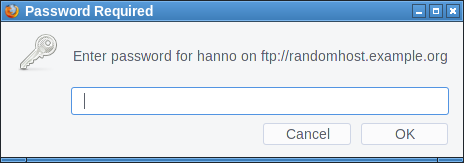
I haven't found any popular site that allows embedding images from non-HTTP-protocols. The most popular page that allows embedding external images at all is Stack Overflow, but it only allows HTTPS. Generally embedding third party images is less common these days, most pages keep local copies if they embed external images.
This bug is yet unfixed.
Obviously one could fix it by showing the same warning for FTP that is shown for HTTP authentication. But I'd rather recommend to completely block authentication dialogs on third party content. This is also what Chrome is doing. Mozilla has been discussing this for several years with no result.
Firefox also has an open bug about disallowing FTP on subresources. This would obviously also fix this scenario.
Window-modal popup via FTP
In the early days of JavaScript web pages could annoy users with popups. Browsers have since changed the behavior of JavaScript popups. They are now tab-modal, which means they're not blocking the interaction with the whole browser, they're just part of one tab and will only block the interaction with the web page that created them.
So it is a goal of modern browsers to not allow web pages to create window-modal alerts that block the interaction with the whole browser. However I figured out FTP gives us a bypass of this restriction.
If Firefox receives some random garbage over an FTP connection that it cannot interpret as FTP commands it will open an alert window showing that garbage.
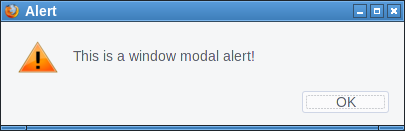
First we open up our fake "FTP-Server" that will simply send a message to all clients. We can just use netcat for this:
while true; do echo "Hello" | nc -l -p 21; doneThen we try to open a connection, e. g. by typing ftp://localhost in the address bar on the same system. Firefox will not show the alert immediately. However if we then click on the URL bar and press enter again it will show the alert window. I tried to replicate that behavior with JavaScript, which worked sometimes. I'm relatively sure this can be made reliable.
There are two problems here. One is that server controlled content is showed to the user without any interpretation. This alert window seems to be intended as some kind of error message. However it doesn't make a lot of sense like that. If at all it should probably be prefixed by some message like "the server sent an invalid command". But ultimately if the browser receives random garbage instead of protocol messages it's probably not wise to display that at all. The second problem is that FTP error messages probably should be tab-modal as well.
This bug is also yet unfixed.
FTP considered dangerous
FTP is an old protocol with many problems. Some consider the fact that browsers still support it a problem. I tend to agree, ideally FTP should simply be removed from modern browsers.
FTP in browsers is insecure by design. While TLS-enabled FTP exists browsers have never supported it. The FTP code is probably not well audited, as it's rarely used. And the fact that another protocol exists that can be used similarly to HTTP has the potential of surprises. For example I found it quite surprising to learn that it's possible to have unencrypted and unauthenticated FTP connections to hosts that enabled HSTS. (The lack of cookie support on FTP seems to avoid causing security issues, but it's still unexpected and feels dangerous.)
Self-XSS in bookmark manager export
The Firefox Bookmark manager allows exporting bookmarks to an HTML document. Before the current Firefox 57 it was possible to inject JavaScript into this exported HTML via the tags field.
I tried to come up with a plausible scenario where this could matter, however this turned out to be difficult. This would be a problematic behavior if there's a way for a web page to create such a bookmark. While it is possible to create a bookmark dialog with JavaScript, this doesn't allow us to prefill the tags field. Thus there is no way a web page can insert any content here.
One could come up with implausible social engineering scenarios (web page asks user to create a bookmark and insert some specific string into the tags field), but that seems very far fetched. A remotely plausible scenario would be a situation where a browser can be used by multiple people who are allowed to create bookmarks and the bookmarks are regularly exported and uploaded to a web page. However that also seems quite far fetched.
This was fixed in the latest Firefox release as CVE-2017-7840 and considered as low severity.
Crashing Firefox on Linux via notification API
The notification API allows browsers to send notification alerts that the operating system will show in small notification windows. A notification can contain a small message and an icon.
When playing this one of the very first things that came to my mind was to check what happens if one simply sends a very large icon. A user has to approve that a web page is allowed to use the notification API, however if he does the result is an immediate crash of the browser. This only "works" on Linux. The proof of concept is quite simple, we just embed a large black PNG via a data URI:
<script>Notification.requestPermission(function(status){

new Notification("",{icon: "data:image/png;base64,iVBORw0KGgoAAAANSUhEUgAAE4gAABOIAQAAAAB147pmAAAL70lEQVR4Ae3BAQ0AAADCIPuntscHD" + "A".repeat(4043) + "yDjFUQABEK0vGQAAAABJRU5ErkJggg==",});

});</script>
I haven't fully tracked down what's causing this, but it seems that Firefox tries to send a message to the system's notification daemon with libnotify and if that's too large for the message size limit of dbus it will not properly handle the resulting error.
What I found quite frustrating is that when I reported it I learned that this was a duplicate of a bug that has already been reported more than a year ago. I feel having such a simple browser crash bug open for such a long time is not appropriate. It is still unfixed.
Thursday, September 7. 2017
In Search of a Secure Time Source
Update: This blogpost was written before NTS was available, and the information is outdated. If you are looking for a modern solution, I recommend using software and a time server with Network Time Security, as specified in RFC 8915.
 All our computers and smartphones have an internal clock and need to know the current time. As configuring the time manually is annoying it's common to set the time via Internet services. What tends to get forgotten is that a reasonably accurate clock is often a crucial part of security features like certificate lifetimes or features with expiration times like HSTS. Thus the timesetting should be secure - but usually it isn't.
I'd like my systems to have a secure time. So I'm looking for a timesetting tool that fullfils two requirements:
Although these seem like trivial requirements to my knowledge such a tool doesn't exist. These are relatively loose requirements. One might want to add:
Some people need a very accurate time source, for example for certain scientific use cases. But that's outside of my scope. For the vast majority of use cases a clock that is off by a few seconds doesn't matter. While it's certainly a good idea to consider rogue servers given the current state of things I'd be happy to have a solution where I simply trust a server from Google or any other major Internet entity.
So let's look at what we have:
NTP
The common way of setting the clock is the NTP protocol. NTP itself has no transport security built in. It's a plaintext protocol open to manipulation and man in the middle attacks.
There are two variants of "secure" NTP. "Autokey", an authenticated variant of NTP, is broken. There's also a symmetric authentication, but that is impractical for widespread use, as it would require to negotiate a pre-shared key with the time server in advance.
NTPsec and Ntimed
In response to some vulnerabilities in the reference implementation of NTP two projects started developing "more secure" variants of NTP. Ntimed - a rewrite by Poul-Henning Kamp - and NTPsec, a fork of the original NTP software. Ntimed hasn't seen any development for several years, NTPsec seems active. NTPsec had some controversies with the developers of the original NTP reference implementation and its main developer is - to put it mildly - a controversial character.
But none of that matters. Both projects don't implement a "secure" NTP. The "sec" in NTPsec refers to the security of the code, not to the security of the protocol itself. It's still just an implementation of the old, insecure NTP.
Network Time Security
There's a draft for a new secure variant of NTP - called Network Time Security. It adds authentication to NTP.
However it's just a draft and it seems stalled. It hasn't been updated for over a year. In any case: It's not widely implemented and thus it's currently not usable. If that changes it may be an option.
tlsdate
tlsdate is a hack abusing the timestamp of the TLS protocol. The TLS timestamp of a server can be used to set the system time. This doesn't provide high accuracy, as the timestamp is only given in seconds, but it's good enough.
I've used and advocated tlsdate for a while, but it has some problems. The timestamp in the TLS handshake doesn't really have any meaning within the protocol, so several implementers decided to replace it with a random value. Unfortunately that is also true for the default server hardcoded into tlsdate.
Some Linux distributions still ship a package with a default server that will send random timestamps. The result is that your system time is set to a random value. I reported this to Ubuntu a while ago. It never got fixed, however the latest Ubuntu version Zesty Zapis (17.04) doesn't ship tlsdate any more.
Given that Google has shipped tlsdate for some in ChromeOS time it seems unlikely that Google will send randomized timestamps any time soon. Thus if you use tlsdate with www.google.com it should work for now. But it's no future-proof solution.
TLS 1.3 removes the TLS timestamp, so this whole concept isn't future-proof. Alternatively it supports using an HTTPS timestamp. The development of tlsdate has stalled, it hasn't seen any updates lately. It doesn't build with the latest version of OpenSSL (1.1) So it likely will become unusable soon.
 OpenNTPD
The developers of OpenNTPD, the NTP daemon from OpenBSD, came up with a nice idea. NTP provides high accuracy, yet no security. Via HTTPS you can get a timestamp with low accuracy. So they combined the two: They use NTP to set the time, but they check whether the given time deviates significantly from an HTTPS host. So the HTTPS host provides safety boundaries for the NTP time.
This would be really nice, if there wasn't a catch: This feature depends on an API only provided by LibreSSL, the OpenBSD fork of OpenSSL. So it's not available on most common Linux systems. (Also why doesn't the OpenNTPD web page support HTTPS?)
Roughtime
Roughtime is a Google project. It fetches the time from multiple servers and uses some fancy cryptography to make sure that malicious servers get detected. If a roughtime server sends a bad time then the client gets a cryptographic proof of the malicious behavior, making it possible to blame and shame rogue servers. Roughtime doesn't provide the high accuracy that NTP provides.
From a security perspective it's the nicest of all solutions. However it fails the availability test. Google provides two reference implementations in C++ and in Go, but it's not packaged for any major Linux distribution. Google has an unfortunate tendency to use unusual dependencies and arcane build systems nobody else uses, so packaging it comes with some challenges.
One line bash script beats all existing solutions
As you can see none of the currently available solutions is really feasible and none fulfils the two mild requirements of authenticity and availability.
This is frustrating given that it's a really simple problem. In fact, it's so simple that you can solve it with a single line bash script:
This line sends an HTTPS request to Google, fetches the date header from the response and passes that to the date command line utility.
It provides authenticity via TLS. If the current system time is far off then this fails, as the TLS connection relies on the validity period of the current certificate. Google currently uses certificates with a validity of around three months. The accuracy is only in seconds, so it doesn't qualify for high accuracy requirements. There's no protection against a rogue Google server providing a wrong time.
Another potential security concern may be that Google might attack the parser of the date setting tool by serving a malformed date string. However I ran american fuzzy lop against it and it looks robust.
While this certainly isn't as accurate as NTP or as secure as roughtime, it's better than everything else that's available. I put this together in a slightly more advanced bash script called httpstime.
All our computers and smartphones have an internal clock and need to know the current time. As configuring the time manually is annoying it's common to set the time via Internet services. What tends to get forgotten is that a reasonably accurate clock is often a crucial part of security features like certificate lifetimes or features with expiration times like HSTS. Thus the timesetting should be secure - but usually it isn't.I'd like my systems to have a secure time. So I'm looking for a timesetting tool that fullfils two requirements:
- It provides authenticity of the time and is not vulnerable to man in the middle attacks.
- It is widely available on common Linux systems.
Although these seem like trivial requirements to my knowledge such a tool doesn't exist. These are relatively loose requirements. One might want to add:
- The timesetting needs to provide a good accuracy.
- The timesetting needs to be protected against malicious time servers.
Some people need a very accurate time source, for example for certain scientific use cases. But that's outside of my scope. For the vast majority of use cases a clock that is off by a few seconds doesn't matter. While it's certainly a good idea to consider rogue servers given the current state of things I'd be happy to have a solution where I simply trust a server from Google or any other major Internet entity.
So let's look at what we have:
NTP
The common way of setting the clock is the NTP protocol. NTP itself has no transport security built in. It's a plaintext protocol open to manipulation and man in the middle attacks.
There are two variants of "secure" NTP. "Autokey", an authenticated variant of NTP, is broken. There's also a symmetric authentication, but that is impractical for widespread use, as it would require to negotiate a pre-shared key with the time server in advance.
NTPsec and Ntimed
In response to some vulnerabilities in the reference implementation of NTP two projects started developing "more secure" variants of NTP. Ntimed - a rewrite by Poul-Henning Kamp - and NTPsec, a fork of the original NTP software. Ntimed hasn't seen any development for several years, NTPsec seems active. NTPsec had some controversies with the developers of the original NTP reference implementation and its main developer is - to put it mildly - a controversial character.
But none of that matters. Both projects don't implement a "secure" NTP. The "sec" in NTPsec refers to the security of the code, not to the security of the protocol itself. It's still just an implementation of the old, insecure NTP.
Network Time Security
There's a draft for a new secure variant of NTP - called Network Time Security. It adds authentication to NTP.
However it's just a draft and it seems stalled. It hasn't been updated for over a year. In any case: It's not widely implemented and thus it's currently not usable. If that changes it may be an option.
tlsdate
tlsdate is a hack abusing the timestamp of the TLS protocol. The TLS timestamp of a server can be used to set the system time. This doesn't provide high accuracy, as the timestamp is only given in seconds, but it's good enough.
I've used and advocated tlsdate for a while, but it has some problems. The timestamp in the TLS handshake doesn't really have any meaning within the protocol, so several implementers decided to replace it with a random value. Unfortunately that is also true for the default server hardcoded into tlsdate.
Some Linux distributions still ship a package with a default server that will send random timestamps. The result is that your system time is set to a random value. I reported this to Ubuntu a while ago. It never got fixed, however the latest Ubuntu version Zesty Zapis (17.04) doesn't ship tlsdate any more.
Given that Google has shipped tlsdate for some in ChromeOS time it seems unlikely that Google will send randomized timestamps any time soon. Thus if you use tlsdate with www.google.com it should work for now. But it's no future-proof solution.
TLS 1.3 removes the TLS timestamp, so this whole concept isn't future-proof. Alternatively it supports using an HTTPS timestamp. The development of tlsdate has stalled, it hasn't seen any updates lately. It doesn't build with the latest version of OpenSSL (1.1) So it likely will become unusable soon.
OpenNTPDThe developers of OpenNTPD, the NTP daemon from OpenBSD, came up with a nice idea. NTP provides high accuracy, yet no security. Via HTTPS you can get a timestamp with low accuracy. So they combined the two: They use NTP to set the time, but they check whether the given time deviates significantly from an HTTPS host. So the HTTPS host provides safety boundaries for the NTP time.
This would be really nice, if there wasn't a catch: This feature depends on an API only provided by LibreSSL, the OpenBSD fork of OpenSSL. So it's not available on most common Linux systems. (Also why doesn't the OpenNTPD web page support HTTPS?)
Roughtime
Roughtime is a Google project. It fetches the time from multiple servers and uses some fancy cryptography to make sure that malicious servers get detected. If a roughtime server sends a bad time then the client gets a cryptographic proof of the malicious behavior, making it possible to blame and shame rogue servers. Roughtime doesn't provide the high accuracy that NTP provides.
From a security perspective it's the nicest of all solutions. However it fails the availability test. Google provides two reference implementations in C++ and in Go, but it's not packaged for any major Linux distribution. Google has an unfortunate tendency to use unusual dependencies and arcane build systems nobody else uses, so packaging it comes with some challenges.
One line bash script beats all existing solutions
As you can see none of the currently available solutions is really feasible and none fulfils the two mild requirements of authenticity and availability.
This is frustrating given that it's a really simple problem. In fact, it's so simple that you can solve it with a single line bash script:
date -s "$(curl -sI https://www.google.com/|grep -i 'date:'|sed -e 's/^.ate: //g')"This line sends an HTTPS request to Google, fetches the date header from the response and passes that to the date command line utility.
It provides authenticity via TLS. If the current system time is far off then this fails, as the TLS connection relies on the validity period of the current certificate. Google currently uses certificates with a validity of around three months. The accuracy is only in seconds, so it doesn't qualify for high accuracy requirements. There's no protection against a rogue Google server providing a wrong time.
Another potential security concern may be that Google might attack the parser of the date setting tool by serving a malformed date string. However I ran american fuzzy lop against it and it looks robust.
While this certainly isn't as accurate as NTP or as secure as roughtime, it's better than everything else that's available. I put this together in a slightly more advanced bash script called httpstime.
Thursday, July 20. 2017
How I tricked Symantec with a Fake Private Key
 Lately, some attention was drawn to a widespread problem with TLS certificates. Many people are accidentally publishing their private keys. Sometimes they are released as part of applications, in Github repositories or with common filenames on web servers.
If a private key is compromised, a certificate authority is obliged to revoke it. The Baseline Requirements – a set of rules that browsers and certificate authorities agreed upon – regulate this and say that in such a case a certificate authority shall revoke the key within 24 hours (Section 4.9.1.1 in the current Baseline Requirements 1.4.8). These rules exist despite the fact that revocation has various problems and doesn’t work very well, but that’s another topic.
I reported various key compromises to certificate authorities recently and while not all of them reacted in time, they eventually revoked all certificates belonging to the private keys. I wondered however how thorough they actually check the key compromises. Obviously one would expect that they cryptographically verify that an exposed private key really is the private key belonging to a certificate.
I registered two test domains at a provider that would allow me to hide my identity and not show up in the whois information. I then ordered test certificates from Symantec (via their brand RapidSSL) and Comodo. These are the biggest certificate authorities and they both offer short term test certificates for free. I then tried to trick them into revoking those certificates with a fake private key.
Forging a private key
To understand this we need to get a bit into the details of RSA keys. In essence a cryptographic key is just a set of numbers. For RSA a public key consists of a modulus (usually named N) and a public exponent (usually called e). You don’t have to understand their mathematical meaning, just keep in mind: They’re nothing more than numbers.
An RSA private key is also just numbers, but more of them. If you have heard any introductory RSA descriptions you may know that a private key consists of a private exponent (called d), but in practice it’s a bit more. Private keys usually contain the full public key (N, e), the private exponent (d) and several other values that are redundant, but they are useful to speed up certain things. But just keep in mind that a public key consists of two numbers and a private key is a public key plus some additional numbers. A certificate ultimately is just a public key with some additional information (like the host name that says for which web page it’s valid) signed by a certificate authority.
A naive check whether a private key belongs to a certificate could be done by extracting the public key parts of both the certificate and the private key for comparison. However it is quite obvious that this isn’t secure. An attacker could construct a private key that contains the public key of an existing certificate and the private key parts of some other, bogus key. Obviously such a fake key couldn’t be used and would only produce errors, but it would survive such a naive check.
I created such fake keys for both domains and uploaded them to Pastebin. If you want to create such fake keys on your own here’s a script. To make my report less suspicious I searched Pastebin for real, compromised private keys belonging to certificates. This again shows how problematic the leakage of private keys is: I easily found seven private keys for Comodo certificates and three for Symantec certificates, plus several more for other certificate authorities, which I also reported. These additional keys allowed me to make my report to Symantec and Comodo less suspicious: I could hide my fake key report within other legitimate reports about a key compromise.
Symantec revoked a certificate based on a forged private key
 Comodo didn’t fall for it. They answered me that there is something wrong with this key. Symantec however answered me that they revoked all certificates – including the one with the fake private key.
No harm was done here, because the certificate was only issued for my own test domain. But I could’ve also fake private keys of other peoples' certificates. Very likely Symantec would have revoked them as well, causing downtimes for those sites. I even could’ve easily created a fake key belonging to Symantec’s own certificate.
The communication by Symantec with the domain owner was far from ideal. I first got a mail that they were unable to process my order. Then I got another mail about a “cancellation request”. They didn’t explain what really happened and that the revocation happened due to a key uploaded on Pastebin.
I then informed Symantec about the invalid key (from my “real” identity), claiming that I just noted there’s something wrong with it. At that point they should’ve been aware that they revoked the certificate in error. Then I contacted the support with my “domain owner” identity and asked why the certificate was revoked. The answer: “I wanted to inform you that your FreeSSL certificate was cancelled as during a log check it was determined that the private key was compromised.”
To summarize: Symantec never told the domain owner that the certificate was revoked due to a key leaked on Pastebin. I assume in all the other cases they also didn’t inform their customers. Thus they may have experienced a certificate revocation, but don’t know why. So they can’t learn and can’t improve their processes to make sure this doesn’t happen again. Also, Symantec still insisted to the domain owner that the key was compromised even after I already had informed them that the key was faulty.
How to check if a private key belongs to a certificate?
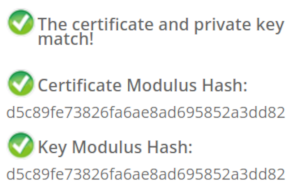 In case you wonder how you properly check whether a private key belongs to a certificate you may of course resort to a Google search. And this was fascinating – and scary – to me: I searched Google for “check if private key matches certificate”. I got plenty of instructions. Almost all of them were wrong. The first result is a page from SSLShopper. They recommend to compare the MD5 hash of the modulus. That they use MD5 is not the problem here, the problem is that this is a naive check only comparing parts of the public key. They even provide a form to check this. (That they ask you to put your private key into a form is a different issue on its own, but at least they have a warning about this and recommend to check locally.)
Furthermore we get the same wrong instructions from the University of Wisconsin, Comodo (good that their engineers were smart enough not to rely on their own documentation), tbs internet (“SSL expert since 1996”), ShellHacks, IBM and RapidSSL (aka Symantec). A post on Stackexchange is the only result that actually mentions a proper check for RSA keys. Two more Stackexchange posts are not related to RSA, I haven’t checked their solutions in detail.
Going to Google results page two among some unrelated links we find more wrong instructions and tools from Symantec (Update 2020: Link offline), SSL247 (“Symantec Specialist Partner Website Security” - they learned from the best) and some private blog. A documentation by Aspera (belonging to IBM) at least mentions that you can check the private key, but in an unrelated section of the document. Also we get more tools that ask you to upload your private key and then not properly check it from SSLChecker.com, the SSL Store (Symantec “Website Security Platinum Partner”), GlobeSSL (“in SSL we trust”) and - well - RapidSSL.
Documented Security Vulnerability in OpenSSL
So if people google for instructions they’ll almost inevitably end up with non-working instructions or tools. But what about other options? Let’s say we want to automate this and have a tool that verifies whether a certificate matches a private key using OpenSSL. We may end up finding that OpenSSL has a function
x509_check_private_key() that can be used to “check the consistency of a private key with the public key in an X509 certificate or certificate request”. Sounds like exactly what we need, right?Well, until you read the full docs and find out that it has a BUGS section: “The check_private_key functions don't check if k itself is indeed a private key or not. It merely compares the public materials (e.g. exponent and modulus of an RSA key) and/or key parameters (e.g. EC params of an EC key) of a key pair.”
I think this is a security vulnerability in OpenSSL (discussion with OpenSSL here). And that doesn’t change just because it’s a documented security vulnerability. Notably there are downstream consumers of this function that failed to copy that part of the documentation, see for example the corresponding PHP function (the limitation is however mentioned in a comment by a user).
So how do you really check whether a private key matches a certificate?
Ultimately there are two reliable ways to check whether a private key belongs to a certificate. One way is to check whether the various values of the private key are consistent and then check whether the public key matches. For example a private key contains values p and q that are the prime factors of the public modulus N. If you multiply them and compare them to N you can be sure that you have a legitimate private key. It’s one of the core properties of RSA that it’s secure based on the assumption that it’s not feasible to calculate p and q from N.
You can use OpenSSL to check the consistency of a private key:
openssl rsa -in [privatekey] -checkFor my forged keys it will tell you:
RSA key error: n does not equal p qYou can then compare the public key, for example by calculating the so-called SPKI SHA256 hash:
openssl pkey -in [privatekey] -pubout -outform der | sha256sumopenssl x509 -in [certificate] -pubkey |openssl pkey -pubin -pubout -outform der | sha256sumAnother way is to sign a message with the private key and then verify it with the public key. You could do it like this:
openssl x509 -in [certificate] -noout -pubkey > pubkey.pemdd if=/dev/urandom of=rnd bs=32 count=1openssl rsautl -sign -pkcs -inkey [privatekey] -in rnd -out sigopenssl rsautl -verify -pkcs -pubin -inkey pubkey.pem -in sig -out checkcmp rnd checkrm rnd check sig pubkey.pemIf cmp produces no output then the signature matches.
As this is all quite complex due to OpenSSLs arcane command line interface I have put this all together in a script. You can pass a certificate and a private key, both in ASCII/PEM format, and it will do both checks.
Summary
Symantec did a major blunder by revoking a certificate based on completely forged evidence. There’s hardly any excuse for this and it indicates that they operate a certificate authority without a proper understanding of the cryptographic background.
Apart from that the problem of checking whether a private key and certificate match seems to be largely documented wrong. Plenty of erroneous guides and tools may cause others to fall for the same trap.
Update: Symantec answered with a blog post.
Thursday, June 15. 2017
Don't leave Coredumps on Web Servers
 Coredumps are a feature of Linux and other Unix systems to analyze crashing software. If a software crashes, for example due to an invalid memory access, the operating system can save the current content of the application's memory to a file. By default it is simply called
 core.While this is useful for debugging purposes it can produce a security risk. If a web application crashes the coredump may simply end up in the web server's root folder. Given that its file name is known an attacker can simply download it via an URL of the form
https://example.org/core. As coredumps contain an application's memory they may expose secret information. A very typical example would be passwords.PHP used to crash relatively often. Recently a lot of these crash bugs have been fixed, in part because PHP now has a bug bounty program. But there are still situations in which PHP crashes. Some of them likely won't be fixed.
How to disclose?
With a scan of the Alexa Top 1 Million domains for exposed core dumps I found around 1.000 vulnerable hosts. I was faced with a challenge: How can I properly disclose this? It is obvious that I wouldn't write hundreds of manual mails. So I needed an automated way to contact the site owners.
Abusix runs a service where you can query the abuse contacts of IP addresses via a DNS query. This turned out to be very useful for this purpose. One could also imagine contacting domain owners directly, but that's not very practical. The domain whois databases have rate limits and don't always expose contact mail addresses in a machine readable way.
Using the abuse contacts doesn't reach all of the affected host operators. Some abuse contacts were nonexistent mail addresses, others didn't have abuse contacts at all. I also got all kinds of automated replies, some of them asking me to fill out forms or do other things, otherwise my message wouldn't be read. Due to the scale I ignored those. I feel that if people make it hard for me to inform them about security problems that's not my responsibility.
I took away two things that I changed in a second batch of disclosures. Some abuse contacts seem to automatically search for IP addresses in the abuse mails. I originally only included affected URLs. So I changed that to include the affected IPs as well.
In many cases I was informed that the affected hosts are not owned by the company I contacted, but by a customer. Some of them asked me if they're allowed to forward the message to them. I thought that would be obvious, but I made it explicit now. Some of them asked me that I contact their customers, which again, of course, is impractical at scale. And sorry: They are your customers, not mine.
How to fix and prevent it?
If you have a coredump on your web host, the obvious fix is to remove it from there. However you obviously also want to prevent this from happening again.
There are two settings that impact coredump creation: A limits setting, configurable via
/etc/security/limits.conf and ulimit and a sysctl interface that can be found under /proc/sys/kernel/core_pattern.The limits setting is a size limit for coredumps. If it is set to zero then no core dumps are created. To set this as the default you can add something like this to your
limits.conf:* soft core 0The sysctl interface sets a pattern for the file name and can also contain a path. You can set it to something like this:
/var/log/core/core.%e.%p.%h.%tThis would store all coredumps under
/var/log/core/ and add the executable name, process id, host name and timestamp to the filename. The directory needs to be writable by all users, you should use a directory with the sticky bit (chmod +t).If you set this via the proc file interface it will only be temporary until the next reboot. To set this permanently you can add it to
/etc/sysctl.conf:kernel.core_pattern = /var/log/core/core.%e.%p.%h.%tSome Linux distributions directly forward core dumps to crash analysis tools. This can be done by prefixing the pattern with a pipe (|). These tools like apport from Ubuntu or abrt from Fedora have also been the source of security vulnerabilities in the past. However that's a separate issue.
Look out for coredumps
My scans showed that this is a relatively common issue. Among popular web pages around one in a thousand were affected before my disclosure attempts. I recommend that pentesters and developers of security scan tools consider checking for this. It's simple: Just try download the
/core file and check if it looks like an executable. In most cases it will be an ELF file, however sometimes it may be a Mach-O (OS X) or an a.out file (very old Linux and Unix systems).Image credit: NASA/JPL-Université Paris Diderot
Friday, May 19. 2017
The Problem with OCSP Stapling and Must Staple and why Certificate Revocation is still broken
Update (2020-09-16): While three years old, people still find this blog post when looking for information about Stapling problems. For Apache the situation has improved considerably in the meantime: mod_md, which is part of recent apache releases, comes with a new stapling implementation which you can enable with the setting MDStapling on.
Today the OCSP servers from Let’s Encrypt were offline for a while. This has caused far more trouble than it should have, because in theory we have all the technologies available to handle such an incident. However due to failures in how they are implemented they don’t really work.
We have to understand some background. Encrypted connections using the TLS protocol like HTTPS use certificates. These are essentially cryptographic public keys together with a signed statement from a certificate authority that they belong to a certain host name.
CRL and OCSP – two technologies that don’t work
Certificates can be revoked. That means that for some reason the certificate should no longer be used. A typical scenario is when a certificate owner learns that his servers have been hacked and his private keys stolen. In this case it’s good to avoid that the stolen keys and their corresponding certificates can still be used. Therefore a TLS client like a browser should check that a certificate provided by a server is not revoked.
That’s the theory at least. However the history of certificate revocation is a history of two technologies that don’t really work.
One method are certificate revocation lists (CRLs). It’s quite simple: A certificate authority provides a list of certificates that are revoked. This has an obvious limitation: These lists can grow. Given that a revocation check needs to happen during a connection it’s obvious that this is non-workable in any realistic scenario.
The second method is called OCSP (Online Certificate Status Protocol). Here a client can query a server about the status of a single certificate and will get a signed answer. This avoids the size problem of CRLs, but it still has a number of problems. Given that connections should be fast it’s quite a high cost for a client to make a connection to an OCSP server during each handshake. It’s also concerning for privacy, as it gives the operator of an OCSP server a lot of information.
However there’s a more severe problem: What happens if an OCSP server is not available? From a security point of view one could say that a certificate that can’t be OCSP-checked should be considered invalid. However OCSP servers are far too unreliable. So practically all clients implement OCSP in soft fail mode (or not at all). Soft fail means that if the OCSP server is not available the certificate is considered valid.
That makes the whole OCSP concept pointless: If an attacker tries to abuse a stolen, revoked certificate he can just block the connection to the OCSP server – and thus a client can’t learn that it’s revoked. Due to this inherent security failure Chrome decided to disable OCSP checking altogether. As a workaround they have something called CRLsets and Mozilla has something similar called OneCRL, which is essentially a big revocation list for important revocations managed by the browser vendor. However this is a weak workaround that doesn’t cover most certificates.
OCSP Stapling and Must Staple to the rescue?
There are two technologies that could fix this: OCSP Stapling and Must-Staple.
OCSP Stapling moves the querying of the OCSP server from the client to the server. The server gets OCSP replies and then sends them within the TLS handshake. This has several advantages: It avoids the latency and privacy implications of OCSP. It also allows surviving short downtimes of OCSP servers, because a TLS server can cache OCSP replies (they’re usually valid for several days).
However it still does not solve the security issue: If an attacker has a stolen, revoked certificate it can be used without Stapling. The browser won’t know about it and will query the OCSP server, this request can again be blocked by the attacker and the browser will accept the certificate.
Therefore an extension for certificates has been introduced that allows us to require Stapling. It’s usually called OCSP Must-Staple and is defined in RFC 7633 (although the RFC doesn’t mention the name Must-Staple, which can cause some confusion). If a browser sees a certificate with this extension that is used without OCSP Stapling it shouldn’t accept it.
So we should be fine. With OCSP Stapling we can avoid the latency and privacy issues of OCSP and we can avoid failing when OCSP servers have short downtimes. With OCSP Must-Staple we fix the security problems. No more soft fail. All good, right?
The OCSP Stapling implementations of Apache and Nginx are broken
Well, here come the implementations. While a lot of protocols use TLS, the most common use case is the web and HTTPS. According to Netcraft statistics by far the biggest share of active sites on the Internet run on Apache (about 46%), followed by Nginx (about 20 %). It’s reasonable to say that if these technologies should provide a solution for revocation they should be usable with the major products in that area. On the server side this is only OCSP Stapling, as OCSP Must Staple only needs to be checked by the client.
What would you expect from a working OCSP Stapling implementation? It should try to avoid a situation where it’s unable to send out a valid OCSP response. Thus roughly what it should do is to fetch a valid OCSP response as soon as possible and cache it until it gets a new one or it expires. It should furthermore try to fetch a new OCSP response long before the old one expires (ideally several days). And it should never throw away a valid response unless it has a newer one. Google developer Ryan Sleevi wrote a detailed description of what a proper OCSP Stapling implementation could look like.
Apache does none of this.
If Apache tries to renew the OCSP response and gets an error from the OCSP server – e. g. because it’s currently malfunctioning – it will throw away the existing, still valid OCSP response and replace it with the error. It will then send out stapled OCSP errors. Which makes zero sense. Firefox will show an error if it sees this. This has been reported in 2014 and is still unfixed.
Now there’s an option in Apache to avoid this behavior: SSLStaplingReturnResponderErrors. It’s defaulting to on. If you switch it off you won’t get sane behavior (that is – use the still valid, cached response), instead Apache will disable Stapling for the time it gets errors from the OCSP server. That’s better than sending out errors, but it obviously makes using Must Staple a no go.
It gets even crazier. I have set this option, but this morning I still got complaints that Firefox users were seeing errors. That’s because in this case the OCSP server wasn’t sending out errors, it was completely unavailable. For that situation Apache has a feature that will fake a tryLater error to send out to the client. If you’re wondering how that makes any sense: It doesn’t. The “tryLater” error of OCSP isn’t useful at all in TLS, because you can’t try later during a handshake which only lasts seconds.
This is controlled by another option: SSLStaplingFakeTryLater. However if we read the documentation it says “Only effective if SSLStaplingReturnResponderErrors is also enabled.” So if we disabled SSLStapingReturnResponderErrors this shouldn’t matter, right? Well: The documentation is wrong.
There are more problems: Apache doesn’t get the OCSP responses on startup, it only fetches them during the handshake. This causes extra latency on the first connection and increases the risk of hitting a situation where you don’t have a valid OCSP response. Also cached OCSP responses don’t survive server restarts, they’re kept in an in-memory cache.
There’s currently no way to configure Apache to handle OCSP stapling in a reasonable way. Here’s the configuration I use, which will at least make sure that it won’t send out errors and cache the responses a bit longer than it does by default:
I’m less familiar with Nginx, but from what I hear it isn’t much better either. According to this blogpost it doesn’t fetch OCSP responses on startup and will send out the first TLS connections without stapling even if it’s enabled. Here’s a blog post that recommends to work around this by connecting to all configured hosts after the server has started.
To summarize: This is all a big mess. Both Apache and Nginx have OCSP Stapling implementations that are essentially broken. As long as you’re using either of those then enabling Must-Staple is a reliable way to shoot yourself in the foot and get into trouble. Don’t enable it if you plan to use Apache or Nginx.
Certificate revocation is broken. It has been broken since the invention of SSL and it’s still broken. OCSP Stapling and OCSP Must-Staple could fix it in theory. But that would require working and stable implementations in the most widely used server products.
Today the OCSP servers from Let’s Encrypt were offline for a while. This has caused far more trouble than it should have, because in theory we have all the technologies available to handle such an incident. However due to failures in how they are implemented they don’t really work.
We have to understand some background. Encrypted connections using the TLS protocol like HTTPS use certificates. These are essentially cryptographic public keys together with a signed statement from a certificate authority that they belong to a certain host name.
CRL and OCSP – two technologies that don’t work
Certificates can be revoked. That means that for some reason the certificate should no longer be used. A typical scenario is when a certificate owner learns that his servers have been hacked and his private keys stolen. In this case it’s good to avoid that the stolen keys and their corresponding certificates can still be used. Therefore a TLS client like a browser should check that a certificate provided by a server is not revoked.
That’s the theory at least. However the history of certificate revocation is a history of two technologies that don’t really work.
One method are certificate revocation lists (CRLs). It’s quite simple: A certificate authority provides a list of certificates that are revoked. This has an obvious limitation: These lists can grow. Given that a revocation check needs to happen during a connection it’s obvious that this is non-workable in any realistic scenario.
The second method is called OCSP (Online Certificate Status Protocol). Here a client can query a server about the status of a single certificate and will get a signed answer. This avoids the size problem of CRLs, but it still has a number of problems. Given that connections should be fast it’s quite a high cost for a client to make a connection to an OCSP server during each handshake. It’s also concerning for privacy, as it gives the operator of an OCSP server a lot of information.
However there’s a more severe problem: What happens if an OCSP server is not available? From a security point of view one could say that a certificate that can’t be OCSP-checked should be considered invalid. However OCSP servers are far too unreliable. So practically all clients implement OCSP in soft fail mode (or not at all). Soft fail means that if the OCSP server is not available the certificate is considered valid.
That makes the whole OCSP concept pointless: If an attacker tries to abuse a stolen, revoked certificate he can just block the connection to the OCSP server – and thus a client can’t learn that it’s revoked. Due to this inherent security failure Chrome decided to disable OCSP checking altogether. As a workaround they have something called CRLsets and Mozilla has something similar called OneCRL, which is essentially a big revocation list for important revocations managed by the browser vendor. However this is a weak workaround that doesn’t cover most certificates.
OCSP Stapling and Must Staple to the rescue?
There are two technologies that could fix this: OCSP Stapling and Must-Staple.
OCSP Stapling moves the querying of the OCSP server from the client to the server. The server gets OCSP replies and then sends them within the TLS handshake. This has several advantages: It avoids the latency and privacy implications of OCSP. It also allows surviving short downtimes of OCSP servers, because a TLS server can cache OCSP replies (they’re usually valid for several days).
However it still does not solve the security issue: If an attacker has a stolen, revoked certificate it can be used without Stapling. The browser won’t know about it and will query the OCSP server, this request can again be blocked by the attacker and the browser will accept the certificate.
Therefore an extension for certificates has been introduced that allows us to require Stapling. It’s usually called OCSP Must-Staple and is defined in RFC 7633 (although the RFC doesn’t mention the name Must-Staple, which can cause some confusion). If a browser sees a certificate with this extension that is used without OCSP Stapling it shouldn’t accept it.
So we should be fine. With OCSP Stapling we can avoid the latency and privacy issues of OCSP and we can avoid failing when OCSP servers have short downtimes. With OCSP Must-Staple we fix the security problems. No more soft fail. All good, right?
The OCSP Stapling implementations of Apache and Nginx are broken
Well, here come the implementations. While a lot of protocols use TLS, the most common use case is the web and HTTPS. According to Netcraft statistics by far the biggest share of active sites on the Internet run on Apache (about 46%), followed by Nginx (about 20 %). It’s reasonable to say that if these technologies should provide a solution for revocation they should be usable with the major products in that area. On the server side this is only OCSP Stapling, as OCSP Must Staple only needs to be checked by the client.
What would you expect from a working OCSP Stapling implementation? It should try to avoid a situation where it’s unable to send out a valid OCSP response. Thus roughly what it should do is to fetch a valid OCSP response as soon as possible and cache it until it gets a new one or it expires. It should furthermore try to fetch a new OCSP response long before the old one expires (ideally several days). And it should never throw away a valid response unless it has a newer one. Google developer Ryan Sleevi wrote a detailed description of what a proper OCSP Stapling implementation could look like.
Apache does none of this.
If Apache tries to renew the OCSP response and gets an error from the OCSP server – e. g. because it’s currently malfunctioning – it will throw away the existing, still valid OCSP response and replace it with the error. It will then send out stapled OCSP errors. Which makes zero sense. Firefox will show an error if it sees this. This has been reported in 2014 and is still unfixed.
Now there’s an option in Apache to avoid this behavior: SSLStaplingReturnResponderErrors. It’s defaulting to on. If you switch it off you won’t get sane behavior (that is – use the still valid, cached response), instead Apache will disable Stapling for the time it gets errors from the OCSP server. That’s better than sending out errors, but it obviously makes using Must Staple a no go.
It gets even crazier. I have set this option, but this morning I still got complaints that Firefox users were seeing errors. That’s because in this case the OCSP server wasn’t sending out errors, it was completely unavailable. For that situation Apache has a feature that will fake a tryLater error to send out to the client. If you’re wondering how that makes any sense: It doesn’t. The “tryLater” error of OCSP isn’t useful at all in TLS, because you can’t try later during a handshake which only lasts seconds.
This is controlled by another option: SSLStaplingFakeTryLater. However if we read the documentation it says “Only effective if SSLStaplingReturnResponderErrors is also enabled.” So if we disabled SSLStapingReturnResponderErrors this shouldn’t matter, right? Well: The documentation is wrong.
There are more problems: Apache doesn’t get the OCSP responses on startup, it only fetches them during the handshake. This causes extra latency on the first connection and increases the risk of hitting a situation where you don’t have a valid OCSP response. Also cached OCSP responses don’t survive server restarts, they’re kept in an in-memory cache.
There’s currently no way to configure Apache to handle OCSP stapling in a reasonable way. Here’s the configuration I use, which will at least make sure that it won’t send out errors and cache the responses a bit longer than it does by default:
SSLStaplingCache shmcb:/var/tmp/ocsp-stapling-cache/cache(128000000)

SSLUseStapling on

SSLStaplingResponderTimeout 2

SSLStaplingReturnResponderErrors off

SSLStaplingFakeTryLater off

SSLStaplingStandardCacheTimeout 86400
I’m less familiar with Nginx, but from what I hear it isn’t much better either. According to this blogpost it doesn’t fetch OCSP responses on startup and will send out the first TLS connections without stapling even if it’s enabled. Here’s a blog post that recommends to work around this by connecting to all configured hosts after the server has started.
To summarize: This is all a big mess. Both Apache and Nginx have OCSP Stapling implementations that are essentially broken. As long as you’re using either of those then enabling Must-Staple is a reliable way to shoot yourself in the foot and get into trouble. Don’t enable it if you plan to use Apache or Nginx.
Certificate revocation is broken. It has been broken since the invention of SSL and it’s still broken. OCSP Stapling and OCSP Must-Staple could fix it in theory. But that would require working and stable implementations in the most widely used server products.
Tuesday, January 26. 2016
Safer use of C code - running Gentoo with Address Sanitizer
Update: When I wrote this blog post it was an open question for me whether using Address Sanitizer in production is a good idea. A recent analysis posted on the oss-security mailing list explains in detail why using Asan in its current form is almost certainly not a good idea. Having any suid binary built with Asan enables a local root exploit - and there are various other issues. Therefore using Gentoo with Address Sanitizer is only recommended for developing and debugging purposes.
 Address Sanitizer is a remarkable feature that is part of the gcc and clang compilers. It can be used to find many typical C bugs - invalid memory reads and writes, use after free errors etc. - while running applications. It has found countless bugs in many software packages. I'm often surprised that many people in the free software community seem to be unaware of this powerful tool.
Address Sanitizer is mainly intended to be a debugging tool. It is usually used to test single applications, often in combination with fuzzing. But as Address Sanitizer can prevent many typical C security bugs - why not use it in production? It doesn't come for free. Address Sanitizer takes significantly more memory and slows down applications by 50 - 100 %. But for some security sensitive applications this may be a reasonable trade-off. The Tor project is already experimenting with this with its Hardened Tor Browser.
One project I've been working on in the past months is to allow a Gentoo system to be compiled with Address Sanitizer. Today I'm publishing this and want to allow others to test it. I have created a page in the Gentoo Wiki that should become the central documentation hub for this project. I published an overlay with several fixes and quirks on Github.
I see this work as part of my Fuzzing Project. (I'm posting it here because the Gentoo category of my personal blog gets indexed by Planet Gentoo.)
I am not sure if using Gentoo with Address Sanitizer is reasonable for a production system. One thing that makes me uneasy in suggesting this for high security requirements is that it's currently incompatible with Grsecurity. But just creating this project already caused me to find a whole number of bugs in several applications. Some notable examples include Coreutils/shred, Bash ([2], [3]), man-db, Pidgin-OTR, Courier, Syslog-NG, Screen, Claws-Mail ([2], [3]), ProFTPD ([2], [3]) ICU, TCL ([2]), Dovecot. I think it was worth the effort.
I will present this work in a talk at FOSDEM in Brussels this Saturday, 14:00, in the Security Devroom.
Address Sanitizer is a remarkable feature that is part of the gcc and clang compilers. It can be used to find many typical C bugs - invalid memory reads and writes, use after free errors etc. - while running applications. It has found countless bugs in many software packages. I'm often surprised that many people in the free software community seem to be unaware of this powerful tool.Address Sanitizer is mainly intended to be a debugging tool. It is usually used to test single applications, often in combination with fuzzing. But as Address Sanitizer can prevent many typical C security bugs - why not use it in production? It doesn't come for free. Address Sanitizer takes significantly more memory and slows down applications by 50 - 100 %. But for some security sensitive applications this may be a reasonable trade-off. The Tor project is already experimenting with this with its Hardened Tor Browser.
One project I've been working on in the past months is to allow a Gentoo system to be compiled with Address Sanitizer. Today I'm publishing this and want to allow others to test it. I have created a page in the Gentoo Wiki that should become the central documentation hub for this project. I published an overlay with several fixes and quirks on Github.
I see this work as part of my Fuzzing Project. (I'm posting it here because the Gentoo category of my personal blog gets indexed by Planet Gentoo.)
I am not sure if using Gentoo with Address Sanitizer is reasonable for a production system. One thing that makes me uneasy in suggesting this for high security requirements is that it's currently incompatible with Grsecurity. But just creating this project already caused me to find a whole number of bugs in several applications. Some notable examples include Coreutils/shred, Bash ([2], [3]), man-db, Pidgin-OTR, Courier, Syslog-NG, Screen, Claws-Mail ([2], [3]), ProFTPD ([2], [3]) ICU, TCL ([2]), Dovecot. I think it was worth the effort.
I will present this work in a talk at FOSDEM in Brussels this Saturday, 14:00, in the Security Devroom.
Monday, November 30. 2015
A little POODLE left in GnuTLS (old versions)
 tl;dr Older GnuTLS versions (2.x) fail to check the first byte of the padding in CBC modes. Various stable Linux distributions, including Ubuntu LTS and Debian wheezy (oldstable) use this version. Current GnuTLS versions are not affected.
A few days ago an email on the ssllabs mailing list catched my attention. A Canonical developer had observed that the SSL Labs test would report the GnuTLS version used in Ubuntu 14.04 (the current long time support version) as vulnerable to the POODLE TLS vulnerability, while other tests for the same vulnerability showed no such issue.
A little background: The original POODLE vulnerability is a weakness of the old SSLv3 protocol that's now officially deprecated. POODLE is based on the fact that SSLv3 does not specify the padding of the CBC modes and the padding bytes can contain arbitrary bytes. A while after POODLE Adam Langley reported that there is a variant of POODLE in TLS, however while the original POODLE is a protocol issue the POODLE TLS vulnerability is an implementation issue. TLS specifies the values of the padding bytes, but some implementations don't check them. Recently Yngve Pettersen reported that there are different variants of this POODLE TLS vulnerability: Some implementations only check parts of the padding. This is the reason why sometimes different tests lead to different results. A test that only changes one byte of the padding will lead to different results than one that changes all padding bytes. Yngve Pettersen uncovered POODLE variants in devices from Cisco (Cavium chip) and Citrix.
I looked at the Ubuntu issue and found that this was exactly such a case of an incomplete padding check: The first byte wasn't checked. I believe this might explain some of the vulnerable hosts Yngve Pettersen found. This is the code:
for (i = 2; i <= pad; i++)

  {

    if (ciphertext.data[ciphertext.size - i] != pad)

    pad_failed = GNUTLS_E_DECRYPTION_FAILED;

  }
The padding in TLS is defined that the rightmost byte of the last block contains the length of the padding. This value is also used in all padding bytes. However the length field itself is not part of the padding. Therefore if we have e. g. a padding length of three this would result in four bytes with the value 3. The above code misses one byte. i goes from 2 (setting block length minus 2) to pad (block length minus pad length), which sets pad length minus one bytes. To correct it we need to change the loop to end with pad+1. The code is completely reworked in current GnuTLS versions, therefore they are not affected. Upstream has officially announced the end of life for GnuTLS 2, but some stable Linux distributions still use it.
The story doesn't end here: After I found this bug I talked about it with Juraj Somorovsky. He mentioned that he already read about this before: In the paper of the Lucky Thirteen attack. That was published in 2013 by Nadhem AlFardan and Kenny Paterson. Here's what the Lucky Thirteen paper has to say about this issue on page 13:
for (i = 2; i < pad; i++)

  {

    if (ciphertext->data[ciphertext->size - i] != ciphertext->data[ciphertext->size - 1])

    pad_failed = GNUTLS_E_DECRYPTION_FAILED;

  }
It is not hard to see that this loop should also cover the edge case i=pad in order to carry out a full padding check. This means that one byte of what should be padding actually has a free format.
If you look closely you will see that this code is actually different from the one I quoted above. The reason is that the GnuTLS version in question already contained a fix that was applied in response to the Lucky Thirteen paper. However what the Lucky Thirteen paper missed is that the original check was off by two bytes, not just one byte. Therefore it only got an incomplete fix reducing the attack surface from two bytes to one.
In a later commit this whole code was reworked in response to the Lucky Thirteen attack and there the problem got fixed for good. However that change never made it into version 2 of GnuTLS. Red Hat / CentOS packages contain a backport patch of those changes, therefore they are not affected.
You might wonder what the impact of this bug is. I'm not totally familiar with the details of all the possible attacks, but the POODLE attack gets increasingly harder if fewer bytes of the padding can be freely set. It most likely is impossible if there is only one byte. The Lucky Thirteen paper says: "This would enable, for example, a variant of the short MAC attack of [28] even if variable length padding was not supported.". People that know more about crypto than I do should be left with the judgement whether this might be practically exploitabe.
Fixing this bug is a simple one-line patch I have attached here. This will silence all POODLE checks, however this doesn't apply all the changes that were made in response to the Lucky Thirteen attack. I'm not sure if the code is practically vulnerable, but Lucky Thirteen is a tricky issue, recently a variant of that attack was shown against Amazon's s2n library.
The missing padding check for the first byte got CVE-2015-8313 assigned. Currently I'm aware of Ubuntu LTS (now fixed) and Debian oldstable (Wheezy) being affected.
Tuesday, June 23. 2015
The tricky security issue with FollowSymLinks and Apache
Sunday, May 17. 2015
About the supposed factoring of a 4096 bit RSA key
 tl;dr News about a broken 4096 bit RSA key are not true. It is just a faulty copy of a valid key.
Earlier today a blog post claiming the factoring of a 4096 bit RSA key was published and quickly made it to the top of Hacker News. The key in question was the PGP key of a well-known Linux kernel developer. I already commented on Hacker News why this is most likely wrong, but I thought I'd write up some more details. To understand what is going on I have to explain some background both on RSA and on PGP keyservers. This by itself is pretty interesting.
RSA public keys consist of two values called N and e. The N value, called the modulus, is the interesting one here. It is the product of two very large prime numbers. The security of RSA relies on the fact that these two numbers are secret. If an attacker would be able to gain knowledge of these numbers he could use them to calculate the private key. That's the reason why RSA depends on the hardness of the factoring problem. If someone can factor N he can break RSA. For all we know today factoring is hard enough to make RSA secure (at least as long as there are no large quantum computers).
Now imagine you have two RSA keys, but they have been generated with bad random numbers. They are different, but one of their primes is the same. That means we have N1=p*q1 and N2=p*q2. In this case RSA is no longer secure, because calculating the greatest common divisor (GCD) of two large numbers can be done very fast with the euclidean algorithm, therefore one can calculate the shared prime value.
It is not only possible to break RSA keys if you have two keys with one shared factors, it is also possible to take a large set of keys and find shared factors between them. In 2012 Arjen Lenstra and his team published a paper using this attack on large scale key sets and at the same time Nadia Heninger and a team at the University of Michigan independently also performed this attack. This uncovered a lot of vulnerable keys on embedded devices, but these were mostly SSH and TLS keys. Lenstra's team however also found two vulnerable PGP keys. For more background you can watch this 29C3 talk by Nadia Heninger, Dan Bernstein and Tanja Lange.
PGP keyservers have been around since quite some time and they have a property that makes them especially interesting for this kind of research: They usually never delete anything. You can add a key to a keyserver, but you cannot remove it, you can only mark it as invalid by revoking it. Therefore using the data from the keyservers gives you a large set of cryptographic keys.
Okay, so back to the news about the supposedly broken 4096 bit key: There is a service called Phuctor where you can upload a key and it'll check it against a set of known vulnerable moduli. This service identified the supposedly vulnerable key.
The key in question has the key id e99ef4b451221121 and belongs to the master key bda06085493bace4. Here is the vulnerable modulus:
c844a98e3372d67f 562bd881da8ea66c a71df16deab1541c e7d68f2243a37665 c3f07d3dd6e651cc d17a822db5794c54 ef31305699a6c77c 043ac87cafc022a3 0a2a717a4aa6b026 b0c1c818cfc16adb aae33c47b0803152 f7e424b784df2861 6d828561a41bdd66 bd220cb46cd288ce 65ccaf9682b20c62 5a84ef28c63e38e9 630daa872270fa15 80cb170bfc492b80 6c017661dab0e0c9 0a12f68a98a98271 82913ff626efddfb f8ae8f1d40da8d13 a90138686884bad1 9db776bb4812f7e3 b288b47114e486fa 2de43011e1d5d7ca 8daf474cb210ce96 2aafee552f192ca0 32ba2b51cfe18322 6eb21ced3b4b3c09 362b61f152d7c7e6 51e12651e915fc9f 67f39338d6d21f55 fb4e79f0b2be4d49 00d442d567bacf7b 6defcd5818b050a4 0db6eab9ad76a7f3 49196dcc5d15cc33 69e1181e03d3b24d a9cf120aa7403f40 0e7e4eca532eac24 49ea7fecc41979d0 35a8e4accea38e1b 9a33d733bea2f430 362bd36f68440ccc 4dc3a7f07b7a7c8f cdd02231f69ce357 4568f303d6eb2916 874d09f2d69e15e6 33c80b8ff4e9baa5 6ed3ace0f65afb43 60c372a6fd0d5629 fdb6e3d832ad3d33 d610b243ea22fe66 f21941071a83b252 201705ebc8e8f2a5 cc01112ac8e43428 50a637bb03e511b2 06599b9d4e8e1ebc eb1e820d569e31c5 0d9fccb16c41315f 652615a02603c69f e9ba03e78c64fecc 034aa783adea213b
In fact this modulus is easily factorable, because it can be divided by 3. However if you look at the master key bda06085493bace4 you'll find another subkey with this modulus:
c844a98e3372d67f 562bd881da8ea66c a71df16deab1541c e7d68f2243a37665 c3f07d3dd6e651cc d17a822db5794c54 ef31305699a6c77c 043ac87cafc022a3 0a2a717a4aa6b026 b0c1c818cfc16adb aae33c47b0803152 f7e424b784df2861 6d828561a41bdd66 bd220cb46cd288ce 65ccaf9682b20c62 5a84ef28c63e38e9 630daa872270fa15 80cb170bfc492b80 6c017661dab0e0c9 0a12f68a98a98271 82c37b8cca2eb4ac 1e889d1027bc1ed6 664f3877cd7052c6 db5567a3365cf7e2 c688b47114e486fa 2de43011e1d5d7ca 8daf474cb210ce96 2aafee552f192ca0 32ba2b51cfe18322 6eb21ced3b4b3c09 362b61f152d7c7e6 51e12651e915fc9f 67f39338d6d21f55 fb4e79f0b2be4d49 00d442d567bacf7b 6defcd5818b050a4 0db6eab9ad76a7f3 49196dcc5d15cc33 69e1181e03d3b24d a9cf120aa7403f40 0e7e4eca532eac24 49ea7fecc41979d0 35a8e4accea38e1b 9a33d733bea2f430 362bd36f68440ccc 4dc3a7f07b7a7c8f cdd02231f69ce357 4568f303d6eb2916 874d09f2d69e15e6 33c80b8ff4e9baa5 6ed3ace0f65afb43 60c372a6fd0d5629 fdb6e3d832ad3d33 d610b243ea22fe66 f21941071a83b252 201705ebc8e8f2a5 cc01112ac8e43428 50a637bb03e511b2 06599b9d4e8e1ebc eb1e820d569e31c5 0d9fccb16c41315f 652615a02603c69f e9ba03e78c64fecc 034aa783adea213b
You may notice that these look pretty similar. But they are not the same. The second one is the real subkey, the first one is just a copy of it with errors.
If you run a batch GCD analysis on the full PGP key server data you will find a number of such keys (Nadia Heninger has published code to do a batch GCD attack). I don't know how they appear on the key servers, I assume they are produced by network errors, harddisk failures or software bugs. It may also be that someone just created them in some experiment.
The important thing is: Everyone can generate a subkey to any PGP key and upload it to a key server. That's just the way the key servers work. They don't check keys in any way. However these keys should pose no threat to anyone. The only case where this could matter would be a broken implementation of the OpenPGP key protocol that does not check if subkeys really belong to a master key.
However you won't be able to easily import such a key into your local GnuPG installation. If you try to fetch this faulty sub key from a key server GnuPG will just refuse to import it. The reason is that every sub key has a signature that proves that it belongs to a certain master key. For those faulty keys this signature is obviously wrong.
Now here's my personal tie in to this story: Last year I started a project to analyze the data on the PGP key servers. And at some point I thought I had found a large number of vulnerable PGP keys – including the key in question here. In a rush I wrote a mail to all people affected. Only later I found out that something was not right and I wrote to all affected people again apologizing. Most of the keys I thought I had found were just faulty keys on the key servers.
The code I used to parse the PGP key server data is public, I also wrote a background paper and did a talk at the BsidesHN conference.
Tuesday, April 7. 2015
How Heartbleed could've been found
 tl;dr With a reasonably simple fuzzing setup I was able to rediscover the Heartbleed bug. This uses state-of-the-art fuzzing and memory protection technology (american fuzzy lop and Address Sanitizer), but it doesn't require any prior knowledge about specifics of the Heartbleed bug or the TLS Heartbeat extension. We can learn from this to find similar bugs in the future.
Exactly one year ago a bug in the OpenSSL library became public that is one of the most well-known security bug of all time: Heartbleed. It is a bug in the code of a TLS extension that up until then was rarely known by anybody. A read buffer overflow allowed an attacker to extract parts of the memory of every server using OpenSSL.
Can we find Heartbleed with fuzzing?
Heartbleed was introduced in OpenSSL 1.0.1, which was released in March 2012, two years earlier. Many people wondered how it could've been hidden there for so long. David A. Wheeler wrote an essay discussing how fuzzing and memory protection technologies could've detected Heartbleed. It covers many aspects in detail, but in the end he only offers speculation on whether or not fuzzing would have found Heartbleed. So I wanted to try it out.
Of course it is easy to find a bug if you know what you're looking for. As best as reasonably possible I tried not to use any specific information I had about Heartbleed. I created a setup that's reasonably simple and similar to what someone would also try it without knowing anything about the specifics of Heartbleed.
Heartbleed is a read buffer overflow. What that means is that an application is reading outside the boundaries of a buffer. For example, imagine an application has a space in memory that's 10 bytes long. If the software tries to read 20 bytes from that buffer, you have a read buffer overflow. It will read whatever is in the memory located after the 10 bytes. These bugs are fairly common and the basic concept of exploiting buffer overflows is pretty old. Just to give you an idea how old: Recently the Chaos Computer Club celebrated the 30th anniversary of a hack of the German BtX-System, an early online service. They used a buffer overflow that was in many aspects very similar to the Heartbleed bug. (It is actually disputed if this is really what happened, but it seems reasonably plausible to me.)
Fuzzing is a widely used strategy to find security issues and bugs in software. The basic idea is simple: Give the software lots of inputs with small errors and see what happens. If the software crashes you likely found a bug.
When buffer overflows happen an application doesn't always crash. Often it will just read (or write if it is a write overflow) to the memory that happens to be there. Whether it crashes depends on a lot of circumstances. Most of the time read overflows won't crash your application. That's also the case with Heartbleed. There are a couple of technologies that improve the detection of memory access errors like buffer overflows. An old and well-known one is the debugging tool Valgrind. However Valgrind slows down applications a lot (around 20 times slower), so it is not really well suited for fuzzing, where you want to run an application millions of times on different inputs.
Address Sanitizer finds more bug
A better tool for our purpose is Address Sanitizer. David A. Wheeler calls it “nothing short of amazing”, and I want to reiterate that. I think it should be a tool that every C/C++ software developer should know and should use for testing.
Address Sanitizer is part of the C compiler and has been included into the two most common compilers in the free software world, gcc and llvm. To use Address Sanitizer one has to recompile the software with the command line parameter -fsanitize=address . It slows down applications, but only by a relatively small amount. According to their own numbers an application using Address Sanitizer is around 1.8 times slower. This makes it feasible for fuzzing tasks.
For the fuzzing itself a tool that recently gained a lot of popularity is american fuzzy lop (afl). This was developed by Michal Zalewski from the Google security team, who is also known by his nick name lcamtuf. As far as I'm aware the approach of afl is unique. It adds instructions to an application during the compilation that allow the fuzzer to detect new code paths while running the fuzzing tasks. If a new interesting code path is found then the sample that created this code path is used as the starting point for further fuzzing.
Currently afl only uses file inputs and cannot directly fuzz network input. OpenSSL has a command line tool that allows all kinds of file inputs, so you can use it for example to fuzz the certificate parser. But this approach does not allow us to directly fuzz the TLS connection, because that only happens on the network layer. By fuzzing various file inputs I recently found two issues in OpenSSL, but both had been found by Brian Carpenter before, who at the same time was also fuzzing OpenSSL.
Let OpenSSL talk to itself
So to fuzz the TLS network connection I had to create a workaround. I wrote a small application that creates two instances of OpenSSL that talk to each other. This application doesn't do any real networking, it is just passing buffers back and forth and thus doing a TLS handshake between a server and a client. Each message packet is written down to a file. It will result in six files, but the last two are just empty, because at that point the handshake is finished and no more data is transmitted. So we have four files that contain actual data from a TLS handshake. If you want to dig into this, a good description of a TLS handshake is provided by the developers of OCaml-TLS and MirageOS.
Then I added the possibility of switching out parts of the handshake messages by files I pass on the command line. By calling my test application selftls with a number and a filename a handshake message gets replaced by this file. So to test just the first part of the server handshake I'd call the test application, take the output file packed-1 and pass it back again to the application by running selftls 1 packet-1. Now we have all the pieces we need to use american fuzzy lop and fuzz the TLS handshake.
I compiled OpenSSL 1.0.1f, the last version that was vulnerable to Heartbleed, with american fuzzy lop. This can be done by calling ./config and then replacing gcc in the Makefile with afl-gcc. Also we want to use Address Sanitizer, to do so we have to set the environment variable AFL_USE_ASAN to 1.
There are some issues when using Address Sanitizer with american fuzzy lop. Address Sanitizer needs a lot of virtual memory (many Terabytes). American fuzzy lop limits the amount of memory an application may use. It is not trivially possible to only limit the real amount of memory an application uses and not the virtual amount, therefore american fuzzy lop cannot handle this flawlessly. Different solutions for this problem have been proposed and are currently developed. I usually go with the simplest solution: I just disable the memory limit of afl (parameter -m -1). This poses a small risk: A fuzzed input may lead an application to a state where it will use all available memory and thereby will cause other applications on the same system to malfuction. Based on my experience this is very rare, so I usually just ignore that potential problem.
After having compiled OpenSSL 1.0.1f we have two files libssl.a and libcrypto.a. These are static versions of OpenSSL and we will use them for our test application. We now also use the afl-gcc to compile our test application:
AFL_USE_ASAN=1 afl-gcc selftls.c -o selftls libssl.a libcrypto.a -ldl
Now we run the application. It needs a dummy certificate. I have put one in the repo. To make things faster I'm using a 512 bit RSA key. This is completely insecure, but as we don't want any security here – we just want to find bugs – this is fine, because a smaller key makes things faster. However if you want to try fuzzing the latest OpenSSL development code you need to create a larger key, because it'll refuse to accept such small keys.
The application will give us six packet files, however the last two will be empty. We only want to fuzz the very first step of the handshake, so we're interested in the first packet. We will create an input directory for american fuzzy lop called in and place packet-1 in it. Then we can run our fuzzing job:
afl-fuzz -i in -o out -m -1 -t 5000 ./selftls 1 @@
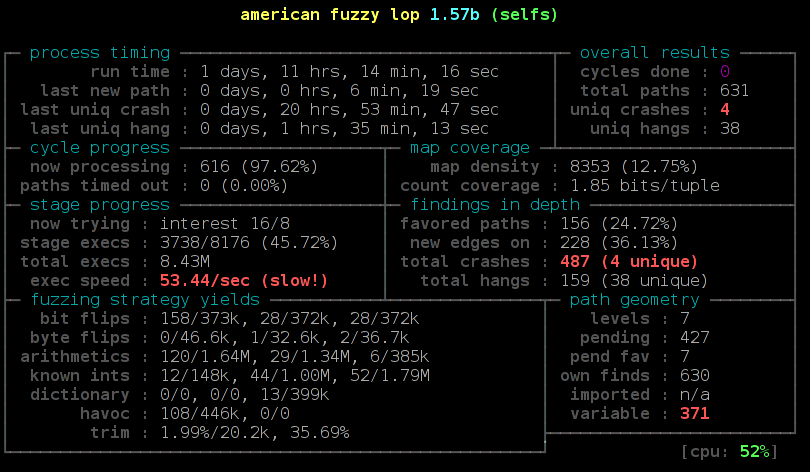
We pass the input and output directory, disable the memory limit and increase the timeout value, because TLS handshakes are slower than common fuzzing tasks. On my test machine around 6 hours later afl found the first crash. Now we can manually pass our output to the test application and will get a stack trace by Address Sanitizer:
==2268==ERROR: AddressSanitizer: heap-buffer-overflow on address 0x629000013748 at pc 0x7f228f5f0cfa bp 0x7fffe8dbd590 sp 0x7fffe8dbcd38
READ of size 32768 at 0x629000013748 thread T0
#0 0x7f228f5f0cf9 (/usr/lib/gcc/x86_64-pc-linux-gnu/4.9.2/libasan.so.1+0x2fcf9)
#1 0x43d075 in memcpy /usr/include/bits/string3.h:51
#2 0x43d075 in tls1_process_heartbeat /home/hanno/code/openssl-fuzz/tests/openssl-1.0.1f/ssl/t1_lib.c:2586
#3 0x50e498 in ssl3_read_bytes /home/hanno/code/openssl-fuzz/tests/openssl-1.0.1f/ssl/s3_pkt.c:1092
#4 0x51895c in ssl3_get_message /home/hanno/code/openssl-fuzz/tests/openssl-1.0.1f/ssl/s3_both.c:457
#5 0x4ad90b in ssl3_get_client_hello /home/hanno/code/openssl-fuzz/tests/openssl-1.0.1f/ssl/s3_srvr.c:941
#6 0x4c831a in ssl3_accept /home/hanno/code/openssl-fuzz/tests/openssl-1.0.1f/ssl/s3_srvr.c:357
#7 0x412431 in main /home/hanno/code/openssl-fuzz/tests/openssl-1.0.1f/selfs.c:85
#8 0x7f228f03ff9f in __libc_start_main (/lib64/libc.so.6+0x1ff9f)
#9 0x4252a1 (/data/openssl/openssl-handshake/openssl-1.0.1f-nobreakrng-afl-asan-fuzz/selfs+0x4252a1)
0x629000013748 is located 0 bytes to the right of 17736-byte region [0x62900000f200,0x629000013748)
allocated by thread T0 here:
#0 0x7f228f6186f7 in malloc (/usr/lib/gcc/x86_64-pc-linux-gnu/4.9.2/libasan.so.1+0x576f7)
#1 0x57f026 in CRYPTO_malloc /home/hanno/code/openssl-fuzz/tests/openssl-1.0.1f/crypto/mem.c:308
We can see here that the crash is a heap buffer overflow doing an invalid read access of around 32 Kilobytes in the function tls1_process_heartbeat(). It is the Heartbleed bug. We found it.
I want to mention a couple of things that I found out while trying this. I did some things that I thought were necessary, but later it turned out that they weren't. After Heartbleed broke the news a number of reports stated that Heartbleed was partly the fault of OpenSSL's memory management. A mail by Theo De Raadt claiming that OpenSSL has “exploit mitigation countermeasures” was widely quoted. I was aware of that, so I first tried to compile OpenSSL without its own memory management. That can be done by calling ./config with the option no-buf-freelist.
But it turns out although OpenSSL uses its own memory management that doesn't defeat Address Sanitizer. I could replicate my fuzzing finding with OpenSSL compiled with its default options. Although it does its own allocation management, it will still do a call to the system's normal malloc() function for every new memory allocation. A blog post by Chris Rohlf digs into the details of the OpenSSL memory allocator.
Breaking random numbers for deterministic behaviour
When fuzzing the TLS handshake american fuzzy lop will report a red number counting variable runs of the application. The reason for that is that a TLS handshake uses random numbers to create the master secret that's later used to derive cryptographic keys. Also the RSA functions will use random numbers. I wrote a patch to OpenSSL to deliberately break the random number generator and let it only output ones (it didn't work with zeros, because OpenSSL will wait for non-zero random numbers in the RSA function).
During my tests this had no noticeable impact on the time it took afl to find Heartbleed. Still I think it is a good idea to remove nondeterministic behavior when fuzzing cryptographic applications. Later in the handshake there are also timestamps used, this can be circumvented with libfaketime, but for the initial handshake processing that I fuzzed to find Heartbleed that doesn't matter.
Conclusion
You may ask now what the point of all this is. Of course we already know where Heartbleed is, it has been patched, fixes have been deployed and it is mostly history. It's been analyzed thoroughly.
The question has been asked if Heartbleed could've been found by fuzzing. I'm confident to say the answer is yes. One thing I should mention here however: American fuzzy lop was already available back then, but it was barely known. It only received major attention later in 2014, after Michal Zalewski used it to find two variants of the Shellshock bug. Earlier versions of afl were much less handy to use, e. g. they didn't have 64 bit support out of the box. I remember that I failed to use an earlier version of afl with Address Sanitizer, it was only possible after a couple of issues were fixed. A lot of other things have been improved in afl, so at the time Heartbleed was found american fuzzy lop probably wasn't in a state that would've allowed to find it in an easy, straightforward way.
I think the takeaway message is this: We have powerful tools freely available that are capable of finding bugs like Heartbleed. We should use them and look for the other Heartbleeds that are still lingering in our software. Take a look at the Fuzzing Project if you're interested in further fuzzing work. There are beginner tutorials that I wrote with the idea in mind to show people that fuzzing is an easy way to find bugs and improve software quality.
I already used my sample application to fuzz the latest OpenSSL code. Nothing was found yet, but of course this could be further tweaked by trying different protocol versions, extensions and other variations in the handshake.
I also wrote a German article about this finding for the IT news webpage Golem.de.
Update:
I want to point out some feedback I got that I think is noteworthy.
On Twitter it was mentioned that Codenomicon actually found Heartbleed via fuzzing. There's a Youtube video from Codenomicon's Antti Karjalainen explaining the details. However the way they did this was quite different, they built a protocol specific fuzzer. The remarkable feature of afl is that it is very powerful without knowing anything specific about the used protocol. Also it should be noted that Heartbleed was found twice, the first one was Neel Mehta from Google.
Kostya Serebryany mailed me that he was able to replicate my findings with his own fuzzer which is part of LLVM, and it was even faster.
In the comments Michele Spagnuolo mentions that by compiling OpenSSL with -DOPENSSL_TLS_SECURITY_LEVEL=0 one can use very short and insecure RSA keys even in the latest version. Of course this shouldn't be done in production, but it is helpful for fuzzing and other testing efforts.
Sunday, March 15. 2015
Talks at BSidesHN about PGP keyserver data and at Easterhegg about TLS
Quicksearch
About me
You can find my web page with links to my work as a journalist at https://hboeck.de/.
You may also find my newsletter about climate change and decarbonization technologies interesting.
Hanno Böck
mail: hanno@hboeck.de
Hanno on Mastodon
Impressum

You may also find my newsletter about climate change and decarbonization technologies interesting.
Hanno Böck
mail: hanno@hboeck.de
Hanno on Mastodon
Impressum
Creative Commons

Unless noted otherwise, all content is CC Zero / public domain

