Entries tagged as key
cryptography aiglx algorithm android apache apt braunschweig browser bsideshn ca cacert ccc cccamp cccamp15 certificate certificates chrome chromium cloudflare cmi compiz crash crypto darmstadt datenschutz deb debian dell deolalikar diffiehellman diploma diplomarbeit easterhegg edellroot eff email encryption english enigma facebook fedora forwardsecrecy gentoo gnupg gpg gsoc hannover hash http https javascript keyexchange keyserver letsencrypt libressl linux maninthemiddle math md5 milleniumproblems mitm modulobias mrmcd mrmcd101b nginx nist nss observatory ocsp ocspstapling openbsd openpgp openssl packagemanagement papierlos password pgp pnp privacy provablesecurity pss random rc2 revocation revoke rpm rsa rsapss schlüssel security server sha1 sha2 sha256 sha512 signatures slides smime ssl stuttgart superfish talk thesis tls transvalid ubuntu unicode university updates utf-8 verschlüsselung vulnerability web websecurity windowsxp wordpress x509 129a adresse agb antigenozidbewegung aok ard bahn berlin bundestag bundesverfassungsgericht bürgerrechte bverfg c4 cctv copyright datamining dataretention datensparsamkeit db demonstration diy einkaufen entropia fernsehen frankfurt freedomnotfear freiheitstattangst fricard gez gpn gpn7 hausdurchsuchung humanistischeunion ice innenpolitik jugendschutz justiz kamera kameraüberwachung karlsruhe köln metis microsoft mobil ninahagen openstreetmap optoutday ör osm peterschaar privatsphäre re-publica re-publica09 rechtsbeugung reklame religion rfid richtervorbehalt rp09 schäuble spam steuerid steuernummer surveillance thermen topberlin überwachung überwachungskameras uni verfassungsgericht verschwörungstheorien verwertungsgesellschaft vgwort videoüberwachung vorratsdatenspeicherung vortrag web20 webmontag werbung wga zdf zigaretten zigarettenautomaten aead aes berserk bleichenbacher cfb cms firefox gajim jabber joomla otr owncloud poodle rss sni update xmpp factoring 27c3 cellular freesoftware frequency fsfe gsm lessig mobilephones openbsc openbts osmocombb wiretapping 0days addresssanitizer adguard adobe afra altushost antivir antivirus asan auskunftsanspruch axfr azure barcamp bash bias bigbluebutton blog bodensee botnetz bsi bufferoverflow bugbounty bundesdatenschutzgesetz bundestrojaner busby bypass c cbc cccamp11 chcounter clamav clang clickjacking code conflictofinterest cookie csrf cve dingens distributions dns domain drupal eplus fileexfiltration firewall freak freewvs ftp fuzzing gallery gcc ghost gimp git glibc gnutls gobi google gstreamer hackerone hacking heartbleed helma infoleak informationdisclosure internetscan ircbot itsecurity jodconverter kaspersky komodia leak libreoffice luckythirteen malware mantis memorysafety mephisto moodle mozilla mpaa mplayer mrmcd100b multimedia mysql napster nessus netfiltersdk newspaper ntp ntpd onlinedurchsuchung openleaks openvas padding panda passwordalert passwort passwörter pdo phishing php privdog protocolfilters python rand redhat rhein s9y salinecourier science serendipity session shellbot shellshock sicherheit snallygaster sniffing sqlinjection squirrelmail staatsanwaltschaft stacktrace study subdomain sunras support taz tlsdate toendacms unicef useafterfree userdir virus vlc vulnerabilities webapps wiesbaden windows xgl xine xsa xss zerodays zugangsdaten zzuf
Wednesday, January 5. 2011
How to create a PGP/GPG-key free of SHA-1
Sunday, December 26. 2010
Goodbye 3DBD3B20, welcome BBB51E42
Tuesday, December 14. 2010
How I revoked my old PGP key
Prologue of this story: A very long time ago (2004 to be exact), I decided to create a new PGP / GnuPG key with 4096 bits (due to this talk). However, shortly after that, I had a hardware failure of my hard disc. The home was a dm-crypt partition with xfs. I was able to restore most data, but it seemed the key was lost. I continued to use my old key I had in a backup and the 4096 key was bitrotting on keyservers. And that always annoyed me. In the meantime, I found all private keys of old DOS (2.6.3i) and Windows (5.0) PGP keys I had created in the past and revoked them, but this 4096 key was still there.
I still have the hard disc in question and a couple of dumps I created during the data rescue back then. Today, I decided that I'll have to try restoring that key again. My strategy was not trying to do anything on the filesystem, but only operate within the image. Very likely the data must be there somewhere.
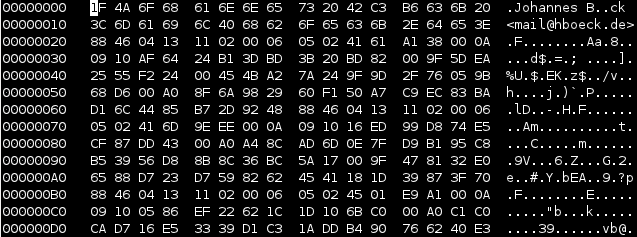
I found a place where I was rather sure that this must be the key. But exporting that piece with dd didn't succeed - looking a bit more at it, it seemed that the beginning was in shape, but at some place there were zeros. I don't know if this is due to the corruption or the fact that the filesystem didn't store the data sequentially at that place - but it didn't matter. I had a look at the file format of PGP keys in RFC 4880. Public keys and private keys are stored pretty similar. Only the beginning (the real "key") part differs, the userid / signatures / rest part is equal. So I was able to extract the private key block (starting with 0x95) with the rest (I just used the place where the first cleartext userid started with my name "Johannes"). What should I say? It worked like a charm. I was able to import my old private key and was able to revoke it. Key 147C5A9F is no longer valid. Great!
P. S.: Next step will be finally creating a new 4096 bit RSA key and abandoning my still-in-use 1024 bit DSA key for good.
I still have the hard disc in question and a couple of dumps I created during the data rescue back then. Today, I decided that I'll have to try restoring that key again. My strategy was not trying to do anything on the filesystem, but only operate within the image. Very likely the data must be there somewhere.
I found a place where I was rather sure that this must be the key. But exporting that piece with dd didn't succeed - looking a bit more at it, it seemed that the beginning was in shape, but at some place there were zeros. I don't know if this is due to the corruption or the fact that the filesystem didn't store the data sequentially at that place - but it didn't matter. I had a look at the file format of PGP keys in RFC 4880. Public keys and private keys are stored pretty similar. Only the beginning (the real "key") part differs, the userid / signatures / rest part is equal. So I was able to extract the private key block (starting with 0x95) with the rest (I just used the place where the first cleartext userid started with my name "Johannes"). What should I say? It worked like a charm. I was able to import my old private key and was able to revoke it. Key 147C5A9F is no longer valid. Great!
P. S.: Next step will be finally creating a new 4096 bit RSA key and abandoning my still-in-use 1024 bit DSA key for good.
Quicksearch
About me
You can find my web page with links to my work as a journalist at https://hboeck.de/.
You may also find my newsletter about climate change and decarbonization technologies interesting.
Hanno Böck
mail: hanno@hboeck.de
Hanno on Mastodon
Impressum

You may also find my newsletter about climate change and decarbonization technologies interesting.
Hanno Böck
mail: hanno@hboeck.de
Hanno on Mastodon
Impressum
Creative Commons

Unless noted otherwise, all content is CC Zero / public domain
