Entries tagged as firefox
berserk bleichenbacher chrome encryption nss openssl poodle security ssl tls browser ajax certificate clickjacking content-security-policy cryptography csp dell edellroot html https javascript khtml konqueror maninthemiddle microsoft php rss sni superfish vulnerability webcore websecurity xss chromium crash diffiehellman forwardsecrecy keyexchange cve debian freesoftware ghost glibc linux redhat gobi helma web apt deb distributions fedora fma86t gnupg gpg hardware laptop notebook openpgp packagemanagement pgp rpm signatures ubuntu wlan aead aes aok apache braunschweig bsideshn ca cacert ccc certificates cfb cms datenschutz easterhegg email gajim hannover jabber joomla key letsencrypt nginx ocsp ocspstapling otr owncloud privacy revocation schlüssel sha1 sha2 talk update verschlüsselung x509 xmpp ffmpeg ape ati audacious codecs fileformats flash flv gstreamer imagemagick legacy libav monkeysaudio mplayer multimedia nvidia presse realaudio realmedia realvideo retro retrocomputing rv30 rv40 shn shorten totem vc-1 video vlc voc vqf win32codecs wmv xine xorg youtube adobe faithfighter gnash marketing molleindustria religion religionskritik schlangenöl snakeoil swfdec wine 23c3 27c3 3d 3ddrucker amusementpark asia backnang base64 bash beijing berlin beryl bios blob bonn bufferoverflow camera canon cellular chdk chemnitz china cinderella cinelerra clt code compiz compizfusion composite compression console copyright creativecommons csrf css ddwrt desktop developingworld digitalcamera disney disneyland driver dvd eltorito evince exe fake film firmware france freeculture freewvs freiegesellschaft freifunk frequencies frequency froscon froscon2007 fsf fsfe gaia games gargoyle gentoo gimp gnome google googleearth graphics grub gsm heartbleed homebrew ibm ico icons icoutils iso itu ixus jugendumweltbewegung jukss karlsruhe kde königswusterhausen kpdf lenovo lessig license lpi lpic lspci lsusb lug memdisk messe mobilephones movie musik nancy nessus nouveau ökologie okular olpc openbsc openbts openexpo opengl opensourceexpo openstreetmap openvas osmocombb pciids pdf phoronix poppler rapidprototyping rar reprap retrogames reverseengineering rmll router s9y science sciencefiction script serendipity sfd shellshock shijingshan siegburg simcity society softwarefreedomday sqlinjection stepmania sumatrapdf sunras syslinux theory thesource theunarchiver thinkpad travel trip2011 tuxmas unar usbids videoediting wii wiibrew wiki windows windowsrefund wiretapping wos wos4 wrestool ftp mozilla xsa zzuf azure bypass domain escapa itsecurity lemmings modulobias mpaa newspaper password passwordalert random salinecourier subdomain userdir 1und1 4k ac100 addresssanitizer aiglx android artikel asan assembler augsburg augsburgerallgemeine bahn c cardreader ccwn clang come2linux core coredump cpu cpufreq darmstadt delilinux demoscene distribution dmidecode drm english entropia essen esslingen frankreich freedesktop gadgets gammu gatos gcc gnokii gphoto gpn gpn5 grsecurity gtk hacker harddisk hash hddtemp howto hp http inkscape installparty iptables kgtk kubuntu libressl lit07 lm_sensors ludwigsburg luga lugbk macos mandriva md5 memorysafety memorystick metisse mobile motherboard mrmcd mrmcd101b network nokia omnibook openbsd overheatd overheating passwörter pcmagazin pcmcia programming proxy ptp qt r300 radeon randr12 ricoh samsung schokokeks sd sdricohcs segfault server smart smartbook smartmontools sncf squid standards subnotebook support symlink t61 time toshiba tv tvout unicode usability usb useafterfree utf-8 vista vortrag waiblingen web20 webhosting webinale webroot webserver x1carbon xgl zeitung copycan etymologie internet paniq presserat schäuble vorratsdatenspeicherung wga diploma diplomarbeit gsoc pss rsa rsapss thesis university afl americanfuzzylop certificateauthority fuzzing privatekey rc2 smime symantec cookie developer drupal gallery infoleak mantis mysql pdo session sizeof sniffing squirrelmail stacktrace cbc gnutls luckythirteen padding 0days adguard afra algorithm altushost antivir antivirus auskunftsanspruch axfr barcamp bias bigbluebutton blog bodensee botnetz bsi bugbounty bundesdatenschutzgesetz bundestrojaner bundesverfassungsgericht busby cccamp11 chcounter clamav cloudflare cmi conflictofinterest crypto deolalikar dingens dns eff eplus facebook fileexfiltration firewall freak git hackerone hacking informationdisclosure internetscan ircbot jodconverter kaspersky komodia leak libreoffice malware math mephisto milleniumproblems mitm moodle mrmcd100b napster netfiltersdk nist ntp ntpd observatory onlinedurchsuchung openleaks panda papierlos passwort phishing pnp privdog protocolfilters provablesecurity python rand rhein sha256 sha512 shellbot sicherheit slides snallygaster spam staatsanwaltschaft study stuttgart taz tlsdate toendacms transvalid überwachung unicef updates virus vulnerabilities webapps webmontag wiesbaden windowsxp wordpress zerodays zugangsdaten calendar cccamp cccamp15 ipv6 planet stadtmitte breach cookies crime heist samesite ard ardget audio cartoon deutschland download feuerwerk filter fireworks flvstreamer fußball gkm kapitalismuskritik kickit klima klimawandel kohle kohlekraftwerk krisis mannheim mediathek mitschnitt nationalismus rfid rtmp rtmpdump theorie wm cedric corruptibles iromance bugtracker github nextcloud okte 1mai egotronic happyhardcore polizeigewalt tengermanbombers torsun zensur
Thursday, November 16. 2017
Some minor Security Quirks in Firefox
 I discovered a couple of more or less minor security issues in Firefox lately. None of them is particularly scary, but they affect interesting corner cases or unusual behavior. I'm posting this mainly hoping that other people will find it inspiring to think about unusual security issues and maybe also come up with more realistic attack scenarios for these bugs.
I'd like to point out that Mozilla hasn't fixed most of those issues, despite all of them being reported several months ago.
Bypassing XSA warning via FTP
XSA or Cross-Site Authentication is an interesting and not very well known attack. It's been discovered by Joachim Breitner in 2005.
Some web pages, mostly forums, allow users to include third party images. This can be abused by an attacker to steal other user's credentials. An attacker first posts something with an image from a server he controls. He then switches on HTTP authentication for that image. All visitors of the page will now see a login dialog on that page. They may be tempted to type in their login credentials into the HTTP authentication dialog, which seems to come from the page they trust.
The original XSA attack is, as said, quite old. As a countermeasure Firefox implements a warning in HTTP authentication dialogs that were created by a subresource like an image. However it only does that for HTTP, not for FTP.
So an attacker can run an FTP server and include an image from there. By then requiring an FTP login and logging all login attempts to the server he can gather credentials. The password dialog will show the host name of the attacker's FTP server, but he could choose one that looks close enough to the targeted web page to not raise suspicion.
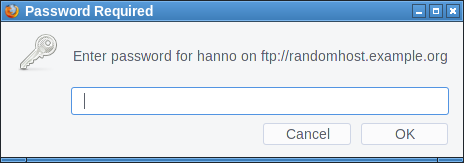
I haven't found any popular site that allows embedding images from non-HTTP-protocols. The most popular page that allows embedding external images at all is Stack Overflow, but it only allows HTTPS. Generally embedding third party images is less common these days, most pages keep local copies if they embed external images.
This bug is yet unfixed.
Obviously one could fix it by showing the same warning for FTP that is shown for HTTP authentication. But I'd rather recommend to completely block authentication dialogs on third party content. This is also what Chrome is doing. Mozilla has been discussing this for several years with no result.
Firefox also has an open bug about disallowing FTP on subresources. This would obviously also fix this scenario.
Window-modal popup via FTP
In the early days of JavaScript web pages could annoy users with popups. Browsers have since changed the behavior of JavaScript popups. They are now tab-modal, which means they're not blocking the interaction with the whole browser, they're just part of one tab and will only block the interaction with the web page that created them.
So it is a goal of modern browsers to not allow web pages to create window-modal alerts that block the interaction with the whole browser. However I figured out FTP gives us a bypass of this restriction.
If Firefox receives some random garbage over an FTP connection that it cannot interpret as FTP commands it will open an alert window showing that garbage.
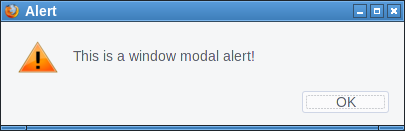
First we open up our fake "FTP-Server" that will simply send a message to all clients. We can just use netcat for this:
while true; do echo "Hello" | nc -l -p 21; doneThen we try to open a connection, e. g. by typing ftp://localhost in the address bar on the same system. Firefox will not show the alert immediately. However if we then click on the URL bar and press enter again it will show the alert window. I tried to replicate that behavior with JavaScript, which worked sometimes. I'm relatively sure this can be made reliable.
There are two problems here. One is that server controlled content is showed to the user without any interpretation. This alert window seems to be intended as some kind of error message. However it doesn't make a lot of sense like that. If at all it should probably be prefixed by some message like "the server sent an invalid command". But ultimately if the browser receives random garbage instead of protocol messages it's probably not wise to display that at all. The second problem is that FTP error messages probably should be tab-modal as well.
This bug is also yet unfixed.
FTP considered dangerous
FTP is an old protocol with many problems. Some consider the fact that browsers still support it a problem. I tend to agree, ideally FTP should simply be removed from modern browsers.
FTP in browsers is insecure by design. While TLS-enabled FTP exists browsers have never supported it. The FTP code is probably not well audited, as it's rarely used. And the fact that another protocol exists that can be used similarly to HTTP has the potential of surprises. For example I found it quite surprising to learn that it's possible to have unencrypted and unauthenticated FTP connections to hosts that enabled HSTS. (The lack of cookie support on FTP seems to avoid causing security issues, but it's still unexpected and feels dangerous.)
Self-XSS in bookmark manager export
The Firefox Bookmark manager allows exporting bookmarks to an HTML document. Before the current Firefox 57 it was possible to inject JavaScript into this exported HTML via the tags field.
I tried to come up with a plausible scenario where this could matter, however this turned out to be difficult. This would be a problematic behavior if there's a way for a web page to create such a bookmark. While it is possible to create a bookmark dialog with JavaScript, this doesn't allow us to prefill the tags field. Thus there is no way a web page can insert any content here.
One could come up with implausible social engineering scenarios (web page asks user to create a bookmark and insert some specific string into the tags field), but that seems very far fetched. A remotely plausible scenario would be a situation where a browser can be used by multiple people who are allowed to create bookmarks and the bookmarks are regularly exported and uploaded to a web page. However that also seems quite far fetched.
This was fixed in the latest Firefox release as CVE-2017-7840 and considered as low severity.
Crashing Firefox on Linux via notification API
The notification API allows browsers to send notification alerts that the operating system will show in small notification windows. A notification can contain a small message and an icon.
When playing this one of the very first things that came to my mind was to check what happens if one simply sends a very large icon. A user has to approve that a web page is allowed to use the notification API, however if he does the result is an immediate crash of the browser. This only "works" on Linux. The proof of concept is quite simple, we just embed a large black PNG via a data URI:
<script>Notification.requestPermission(function(status){

new Notification("",{icon: "data:image/png;base64,iVBORw0KGgoAAAANSUhEUgAAE4gAABOIAQAAAAB147pmAAAL70lEQVR4Ae3BAQ0AAADCIPuntscHD" + "A".repeat(4043) + "yDjFUQABEK0vGQAAAABJRU5ErkJggg==",});

});</script>
I haven't fully tracked down what's causing this, but it seems that Firefox tries to send a message to the system's notification daemon with libnotify and if that's too large for the message size limit of dbus it will not properly handle the resulting error.
What I found quite frustrating is that when I reported it I learned that this was a duplicate of a bug that has already been reported more than a year ago. I feel having such a simple browser crash bug open for such a long time is not appropriate. It is still unfixed.
Friday, January 30. 2015
What the GHOST tells us about free software vulnerability management
 On Tuesday details about the security vulnerability GHOST in Glibc were published by the company Qualys. When severe security vulnerabilities hit the news I always like to take this as a chance to learn what can be improved and how to avoid similar incidents in the future (see e. g. my posts on Heartbleed/Shellshock, POODLE/BERserk and NTP lately).
GHOST itself is a Heap Overflow in the name resolution function of the Glibc. The Glibc is the standard C library on Linux systems, almost every software that runs on a Linux system uses it. It is somewhat unclear right now how serious GHOST really is. A lot of software uses the affected function gethostbyname(), but a lot of conditions have to be met to make this vulnerability exploitable. Right now the most relevant attack is against the mail server exim where Qualys has developed a working exploit which they plan to release soon. There have been speculations whether GHOST might be exploitable through Wordpress, which would make it much more serious.
Technically GHOST is a heap overflow, which is a very common bug in C programming. C is inherently prone to these kinds of memory corruption errors and there are essentially two things here to move forwards: Improve the use of exploit mitigation techniques like ASLR and create new ones (levee is an interesting project, watch this 31C3 talk). And if possible move away from C altogether and develop core components in memory safe languages (I have high hopes for the Mozilla Servo project, watch this linux.conf.au talk).
GHOST was discovered three times
But the thing I want to elaborate here is something different about GHOST: It turns out that it has been discovered independently three times. It was already fixed in 2013 in the Glibc Code itself. The commit message didn't indicate that it was a security vulnerability. Then in early 2014 developers at Google found it again using Address Sanitizer (which – by the way – tells you that all software developers should use Address Sanitizer more often to test their software). Google fixed it in Chrome OS and explicitly called it an overflow and a vulnerability. And then recently Qualys found it again and made it public.
Now you may wonder why a vulnerability fixed in 2013 made headlines in 2015. The reason is that it widely wasn't fixed because it wasn't publicly known that it was serious. I don't think there was any malicious intent. The original Glibc fix was probably done without anyone noticing that it is serious and the Google devs may have thought that the fix is already public, so they don't need to make any noise about it. But we can clearly see that something doesn't work here. Which brings us to a discussion how the Linux and free software world in general and vulnerability management in particular work.
The “Never touch a running system” principle
Quite early when I came in contact with computers I heard the phrase “Never touch a running system”. This may have been a reasonable approach to IT systems back then when computers usually weren't connected to any networks and when remote exploits weren't a thing, but it certainly isn't a good idea today in a world where almost every computer is part of the Internet. Because once new security vulnerabilities become public you should change your system and fix them. However that doesn't change the fact that many people still operate like that.
A number of Linux distributions provide “stable” or “Long Time Support” versions. Basically the idea is this: At some point they take the current state of their systems and further updates will only contain important fixes and security updates. They guarantee to fix security vulnerabilities for a certain time frame. This is kind of a compromise between the “Never touch a running system” approach and reasonable security. It tries to give you a system that will basically stay the same, but you get fixes for security issues. Popular examples for this approach are the stable branch of Debian, Ubuntu LTS versions and the Enterprise versions of Red Hat and SUSE.
To give you an idea about time frames, Debian currently supports the stable trees Squeeze (6.0) which was released 2011 and Wheezy (7.0) which was released 2013. Red Hat Enterprise Linux has currently 4 supported version (4, 5, 6, 7), the oldest one was originally released in 2005. So we're talking about pretty long time frames that these systems get supported. Ubuntu and Suse have similar long time supported Systems.
These systems are delivered with an implicit promise: We will take care of security and if you update regularly you'll have a system that doesn't change much, but that will be secure against know threats. Now the interesting question is: How well do these systems deliver on that promise and how hard is that?
Vulnerability management is chaotic and fragile
I'm not sure how many people are aware how vulnerability management works in the free software world. It is a pretty fragile and chaotic process. There is no standard way things work. The information is scattered around many different places. Different people look for vulnerabilities for different reasons. Some are developers of the respective projects themselves, some are companies like Google that make use of free software projects, some are just curious people interested in IT security or researchers. They report a bug through the channels of the respective project. That may be a mailing list, a bug tracker or just a direct mail to the developer. Hopefully the developers fix the issue. It does happen that the person finding the vulnerability first has to explain to the developer why it actually is a vulnerability. Sometimes the fix will happen in a public code repository, sometimes not. Sometimes the developer will mention that it is a vulnerability in the commit message or the release notes of the new version, sometimes not. There are notorious projects that refuse to handle security vulnerabilities in a transparent way. Sometimes whoever found the vulnerability will post more information on his/her blog or on a mailing list like full disclosure or oss-security. Sometimes not. Sometimes vulnerabilities get a CVE id assigned, sometimes not.
Add to that the fact that in many cases it's far from clear what is a security vulnerability. It is absolutely common that if you ask the people involved whether this is serious the best and most honest answer they can give is “we don't know”. And very often bugs get fixed without anyone noticing that it even could be a security vulnerability.
Then there are projects where the number of security vulnerabilities found and fixed is really huge. The latest Chrome 40 release had 62 security fixes, version 39 had 42. Chrome releases a new version every two months. Browser vulnerabilities are found and fixed on a daily basis. Not that extreme but still high is the vulnerability count in PHP, which is especially worrying if you know that many webhosting providers run PHP versions not supported any more.
So you probably see my point: There is a very chaotic stream of information in various different places about bugs and vulnerabilities in free software projects. The number of vulnerabilities is huge. Making a promise that you will scan all this information for security vulnerabilities and backport the patches to your operating system is a big promise. And I doubt anyone can fulfill that.
GHOST is a single example, so you might ask how often these things happen. At some point right after GHOST became public this excerpt from the Debian Glibc changelog caught my attention (excuse the bad quality, had to take the image from Twitter because I was unable to find that changelog on Debian's webpages):
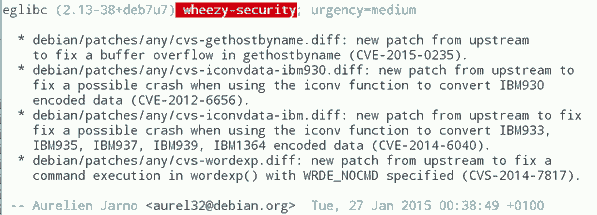
What you can see here: While Debian fixed GHOST (which is CVE-2015-0235) they also fixed CVE-2012-6656 – a security issue from 2012. Admittedly this is a minor issue, but it's a vulnerability nevertheless. A quick look at the Debian changelog of Chromium both in squeeze and wheezy will tell you that they aren't fixing all the recent security issues in it. (Debian already had discussions about removing Chromium and in Wheezy they don't stick to a single version.)
It would be an interesting (and time consuming) project to take a package like PHP and check for all the security vulnerabilities whether they are fixed in the latest packages in Debian Squeeze/Wheezy, all Red Hat Enterprise versions and other long term support systems. PHP is probably more interesting than browsers, because the high profile targets for these vulnerabilities are servers. What worries me: I'm pretty sure some people already do that. They just won't tell you and me, instead they'll write their exploits and sell them to repressive governments or botnet operators.
Then there are also stories like this: Tavis Ormandy reported a security issue in Glibc in 2012 and the people from Google's Project Zero went to great lengths to show that it is actually exploitable. Reading the Glibc bug report you can learn that this was already reported in 2005(!), just nobody noticed back then that it was a security issue and it was minor enough that nobody cared to fix it.
There are also bugs that require changes so big that backporting them is essentially impossible. In the TLS world a lot of protocol bugs have been highlighted in recent years. Take Lucky Thirteen for example. It is a timing sidechannel in the way the TLS protocol combines the CBC encryption, padding and authentication. I like to mention this bug because I like to quote it as the TLS bug that was already mentioned in the specification (RFC 5246, page 23: "This leaves a small timing channel"). The real fix for Lucky Thirteen is not to use the erratic CBC mode any more and switch to authenticated encryption modes which are part of TLS 1.2. (There's another possible fix which is using Encrypt-then-MAC, but it is hardly deployed.) Up until recently most encryption libraries didn't support TLS 1.2. Debian Squeeze and Red Hat Enterprise 5 ship OpenSSL versions that only support TLS 1.0. There is no trivial patch that could be backported, because this is a huge change. What they likely backported are workarounds that avoid the timing channel. This will stop the attack, but it is not a very good fix, because it keeps the problematic old protocol and will force others to stay compatible with it.
LTS and stable distributions are there for a reason
The big question is of course what to do about it. OpenBSD developer Ted Unangst wrote a blog post yesterday titled Long term support considered harmful, I suggest you read it. He argues that we should get rid of long term support completely and urge users to upgrade more often. OpenBSD has a 6 month release cycle and supports two releases, so one version gets supported for one year.
Given what I wrote before you may think that I agree with him, but I don't. While I personally always avoided to use too old systems – I 'm usually using Gentoo which doesn't have any snapshot releases at all and does rolling releases – I can see the value in long term support releases. There are a lot of systems out there – connected to the Internet – that are never updated. Taking away the option to install systems and let them run with relatively little maintenance overhead over several years will probably result in more systems never receiving any security updates. With all its imperfectness running a Debian Squeeze with the latest updates is certainly better than running an operating system from 2011 that stopped getting security fixes in 2012.
Improving the information flow
I don't think there is a silver bullet solution, but I think there are things we can do to improve the situation. What could be done is to coordinate and share the work. Debian, Red Hat and other distributions with stable/LTS versions could agree that their next versions are based on a specific Glibc version and they collaboratively work on providing patch sets to fix all the vulnerabilities in it. This already somehow happens with upstream projects providing long term support versions, the Linux kernel does that for example. Doing that at scale would require vast organizational changes in the Linux distributions. They would have to agree on a roughly common timescale to start their stable versions.
What I'd consider the most crucial thing is to improve and streamline the information flow about vulnerabilities. When Google fixes a vulnerability in Chrome OS they should make sure this information is shared with other Linux distributions and the public. And they should know where and how they should share this information.
One mechanism that tries to organize the vulnerability process is the system of CVE ids. The idea is actually simple: Publicly known vulnerabilities get a fixed id and they are in a public database. GHOST is CVE-2015-0235 (the scheme will soon change because four digits aren't enough for all the vulnerabilities we find every year). I got my first CVEs assigned in 2007, so I have some experiences with the CVE system and they are rather mixed. Sometimes I briefly mention rather minor issues in a mailing list thread and a CVE gets assigned right away. Sometimes I explicitly ask for CVE assignments and never get an answer.
I would like to see that we just assign CVEs for everything that even remotely looks like a security vulnerability. However right now I think the process is to unreliable to deliver that. There are other public vulnerability databases like OSVDB, I have limited experience with them, so I can't judge if they'd be better suited. Unfortunately sometimes people hesitate to request CVE ids because others abuse the CVE system to count assigned CVEs and use this as a metric how secure a product is. Such bad statistics are outright dangerous, because it gives people an incentive to downplay vulnerabilities or withhold information about them.
This post was partly inspired by some discussions on oss-security
Tuesday, November 4. 2014
Dancing protocols, POODLEs and other tales from TLS

The latest SSL attack was called POODLE. Image source
.
I think it is crucial to understand what led to these vulnerabilities. I find POODLE and BERserk so interesting because these two vulnerabilities were both unnecessary and could've been avoided by intelligent design choices. Okay, let's start by investigating what went wrong.
The mess with CBC
POODLE (Padding Oracle On Downgraded Legacy Encryption) is a weakness in the CBC block mode and the padding of the old SSL protocol. If you've followed previous stories about SSL/TLS vulnerabilities this shouldn't be news. There have been a whole number of CBC-related vulnerabilities, most notably the Padding oracle (2003), the BEAST attack (2011) and the Lucky Thirteen attack (2013) (Lucky Thirteen is kind of my favorite, because it was already more or less mentioned in the TLS 1.2 standard). The POODLE attack builds on ideas already used in previous attacks.
CBC is a so-called block mode. For now it should be enough to understand that we have two kinds of ciphers we use to authenticate and encrypt connections – block ciphers and stream ciphers. Block ciphers need a block mode to operate. There's nothing necessarily wrong with CBC, it's the way CBC is used in SSL/TLS that causes problems. There are two weaknesses in it: Early versions (before TLS 1.1) use a so-called implicit Initialization Vector (IV) and they use a method called MAC-then-Encrypt (used up until the very latest TLS 1.2, but there's a new extension to fix it) which turned out to be quite fragile when it comes to security. The CBC details would be a topic on their own and I won't go into the details now. The long-term goal should be to get rid of all these (old-style) CBC modes, however that won't be possible for quite some time due to compatibility reasons. As most of these problems have been known since 2003 it's about time.
The evil Protocol Dance
The interesting question with POODLE is: Why does a security issue in an ancient protocol like SSLv3 bother us at all? SSL was developed by Netscape in the mid 90s, it has two public versions: SSLv2 and SSLv3. In 1999 (15 years ago) the old SSL was deprecated and replaced with TLS 1.0 standardized by the IETF. Now people still used SSLv3 up until very recently mostly for compatibility reasons. But even that in itself isn't the problem. SSL/TLS has a mechanism to safely choose the best protocol available. In a nutshell it works like this:
a) A client (e. g. a browser) connects to a server and may say something like "I want to connect with TLS 1.2“
b) The server may answer "No, sorry, I don't understand TLS 1.2, can you please connect with TLS 1.0?“
c) The client says "Ok, let's connect with TLS 1.0“
The point here is: Even if both server and client support the ancient SSLv3, they'd usually not use it. But this is the idealized world of standards. Now welcome to the real world, where things like this happen:
a) A client (e. g. a browser) connects to a server and may say something like "I want to connect with TLS 1.2“
b) The server thinks "Oh, TLS 1.2, never heard of that. What should I do? I better say nothing at all...“
c) The browser thinks "Ok, server doesn't answer, maybe we should try something else. Hey, server, I want to connect with TLS 1.1“
d) The browser will retry all SSL versions down to SSLv3 till it can connect.

The Protocol Dance is a Dance with the Devil. Image source
I first encountered the Protocol Dance back in 2008. Back then I already used a technology called SNI (Server Name Indication) that allows to have multiple websites with multiple certificates on a single IP address. I regularly got complains from people who saw the wrong certificates on those SNI webpages. A bug report to Firefox and some analysis revealed the reason: The protocol downgrades don't just happen when servers don't answer to new protocol requests, they also can happen on faulty or weak internet connections. SSLv3 does not support SNI, so when a downgrade to SSLv3 happens you get the wrong certificate. This was quite frustrating: A compatibility feature that was purely there to support broken hardware caused my completely legit setup to fail every now and then.
But the more severe problem is this: The Protocol Dance will allow an attacker to force downgrades to older (less secure) protocols. He just has to stop connection attempts with the more secure protocols. And this is why the POODLE attack was an issue after all: The problem was not backwards compatibility. The problem was attacker-controlled backwards compatibility.
The idea that the Protocol Dance might be a security issue wasn't completely new either. At the Black Hat conference this year Antoine Delignat-Lavaud presented a variant of an attack he calls "Virtual Host Confusion“ where he relied on downgrading connections to force SSLv3 connections.
"Whoever breaks it first“ - principle
The Protocol Dance is an example for something that I feel is an unwritten rule of browser development today: Browser vendors don't want things to break – even if the breakage is the fault of someone else. So they add all kinds of compatibility technologies that are purely there to support broken hardware. The idea is: When someone introduced broken hardware at some point – and it worked because the brokenness wasn't triggered at that point – the broken stuff is allowed to stay and all others have to deal with it.
To avoid the Protocol Dance a new feature is now on its way: It's called SCSV and the idea is that the Protocol Dance is stopped if both the server and the client support this new protocol feature. I'm extremely uncomfortable with that solution because it just adds another layer of duct tape and increases the complexity of TLS which already is much too complex.
There's another recent example which is very similar: At some point people found out that BIG-IP load balancers by the company F5 had trouble with TLS connection attempts larger than 255 bytes. However it was later revealed that connection attempts bigger than 512 bytes also succeed. So a padding extension was invented and it's now widespread behaviour of TLS implementations to avoid connection attempts between 256 and 511 bytes. To make matters completely insane: It was later found out that there is other broken hardware – SMTP servers by Ironport – that breaks when the handshake is larger than 511 bytes.
I have a principle when it comes to fixing things: Fix it where its broken. But the browser world works differently. It works with the „whoever breaks it first defines the new standard of brokenness“-principle. This is partly due to an unhealthy competition between browsers. Unfortunately they often don't compete very well on the security level. What you'll constantly hear is that browsers can't break any webpages because that will lead to people moving to other browsers.
I'm not sure if I entirely buy this kind of reasoning. For a couple of months the support for the ftp protocol in Chrome / Chromium is broken. I'm no fan of plain, unencrypted ftp and its only legit use case – unauthenticated file download – can just as easily be fulfilled with unencrypted http, but there are a number of live ftp servers that implement a legit and working protocol. I like Chromium and it's my everyday browser, but for a while the broken ftp support was the most prevalent reason I tend to start Firefox. This little episode makes it hard for me to believe that they can't break connections to some (broken) ancient SSL servers. (I just noted that the very latest version of Chromium has fixed ftp support again.)
BERserk, small exponents and PKCS #1 1.5

We have a problem with weak keys. Image source
BERserk is actually a variant of a quite old vulnerability (you may begin to see a pattern here): The Bleichenbacher attack on RSA first presented at Crypto 2006. Now here things get confusing, because the cryptographer Daniel Bleichenbacher found two independent vulnerabilities in RSA. One in the RSA encryption in 1998 and one in RSA signatures in 2006, for convenience I'll call them BB98 (encryption) and BB06 (signatures). Both of these vulnerabilities expose faulty implementations of the old RSA standard PKCS #1 1.5. And both are what I like to call "zombie vulnerabilities“. They keep coming back, no matter how often you try to fix them. In April the BB98 vulnerability was re-discovered in the code of Java and it was silently fixed in OpenSSL some time last year.
But BERserk is about the other one: BB06. BERserk exposes the fact that inside the RSA function an algorithm identifier for the used hash function is embedded and its encoded with BER. BER is part of ASN.1. I could tell horror stories about ASN.1, but I'll spare you that for now, maybe this is a topic for another blog entry. It's enough to know that it's a complicated format and this is what bites us here: With some trickery in the BER encoding one can add further data into the RSA function – and this allows in certain situations to create forged signatures.
One thing should be made clear: Both the original BB06 attack and BERserk are flaws in the implementation of PKCS #1 1.5. If you do everything correct then you're fine. These attacks exploit the relatively simple structure of the old PKCS standard and they only work when RSA is done with a very small exponent. RSA public keys consist of two large numbers. The modulus N (which is a product of two large primes) and the exponent.
In his presentation at Crypto 2006 Daniel Bleichenbacher already proposed what would have prevented this attack: Just don't use RSA keys with very small exponents like three. This advice also went into various recommendations (e. g. by NIST) and today almost everyone uses 65537 (the reason for this number is that due to its binary structure calculations with it are reasonably fast).
There's just one problem: A small number of keys are still there that use the exponent e=3. And six of them are used by root certificates installed in every browser. These root certificates are the trust anchor of TLS (which in itself is a problem, but that's another story). Here's our problem: As long as there is one single root certificate with e=3 with such an attack you can create as many fake certificates as you want. If we had deprecated e=3 keys BERserk would've been mostly a non-issue.
There is one more aspect of this story: What's this PKCS #1 1.5 thing anyway? It's an old standard for RSA encryption and signatures. I want to quote Adam Langley on the PKCS standards here: "In a modern light, they are all completely terrible. If you wanted something that was plausible enough to be widely implemented but complex enough to ensure that cryptography would forever be hamstrung by implementation bugs, you would be hard pressed to do better."
Now there's a successor to the PKCS #1 1.5 standard: PKCS #1 2.1, which is based on technologies called PSS (Probabilistic Signature Scheme) and OAEP (Optimal Asymmetric Encryption Padding). It's from 2002 and in many aspects it's much better. I am kind of a fan here, because I wrote my thesis about this. There's just one problem: Although already standardized 2002 people still prefer to use the much weaker old PKCS #1 1.5. TLS doesn't have any way to use the newer PKCS #1 2.1 and even the current drafts for TLS 1.3 stick to the older - and weaker - variant.
What to do
I would take bets that POODLE wasn't the last TLS/CBC-issue we saw and that BERserk wasn't the last variant of the BB06-attack. Basically, I think there are a number of things TLS implementers could do to prevent further similar attacks:
* The Protocol Dance should die. Don't put another layer of duct tape around it (SCSV), just get rid of it. It will break a small number of already broken devices, but that is a reasonable price for avoiding the next protocol downgrade attack scenario. Backwards compatibility shouldn't compromise security.
* More generally, I think the working around for broken devices has to stop. Replace the „whoever broke it first“ paradigm with a „fix it where its broken“ paradigm. That also means I think the padding extension should be scraped.
* Keys with weak choices need to be deprecated at some point. In a long process browsers removed most certificates with short 1024 bit keys. They're working hard on deprecating signatures with the weak SHA1 algorithm. I think e=3 RSA keys should be next on the list for deprecation.
* At some point we should deprecate the weak CBC modes. This is probably the trickiest part, because up until very recently TLS 1.0 was all that most major browsers supported. The only way to avoid them is either using the GCM mode of TLS 1.2 (most browsers just got support for that in recent months) or using a very new extension that's rarely used at all today.
* If we have better technologies we should start using them. PKCS #1 2.1 is clearly superior to PKCS #1 1.5, at least if new standards get written people should switch to it.
Update: I just read that Mozilla Firefox devs disabled the protocol dance in their latest nightly build. Let's hope others follow.
Thursday, September 9. 2010
Test your browser for Clickjacking protection
Friday, January 11. 2008
How long does it take to fix a crash-bug?
Thursday, August 10. 2006
Playing youtube videos with free software
Quicksearch
About me
You can find my web page with links to my work as a journalist at https://hboeck.de/.
You may also find my newsletter about climate change and decarbonization technologies interesting.
Hanno Böck
mail: hanno@hboeck.de
Hanno on Mastodon
Impressum

You may also find my newsletter about climate change and decarbonization technologies interesting.
Hanno Böck
mail: hanno@hboeck.de
Hanno on Mastodon
Impressum
Creative Commons

Unless noted otherwise, all content is CC Zero / public domain


