Entries tagged as english
babelfish china chinese googletranslate language mandarin russia russian translation travel universaltranslator cacert aiglx blog ca calendar certificate come2linux compiz cryptography eff email encryption essen games https ipv6 karlsruhe kubik linux ludwigsburg lug lugbk observatory openssl openstreetmap planet rc2 rsa schokokeks security serendipity simplesharingextensions smime ssl stadtmitte tls web20 webinale webmontag wine x509 xgl camera canon chdk digitalcamera freesoftware gadgets gammu gnokii gphoto ixus mobile nokia ptp time saturn almaty amusementpark asia asia2013 aviation azerbaijan beijing belarus berlin boluo border boten bus capsulehotel casino caspian ccp censorship childrensday chinghai cinderella climatechange coach coffee copycat copyright disney disneyland dunhuang ecology erenhot erlian fake ferry flying freizeitpark ghosttown greatfirewall guangzhou haikou hainan hallstatt hohhot hongkong hostel hotel huizhou journalismus journey kazakhstan khorgas laos luoyang miradormansion mongolia moscow northwestchina petropavl poland presse pressefreiheit pyramid rain rainforest sanya seat61 shijingshan stepmania suprememaster tagesschau terracottawarriors tiananmen train transsiberian travelling trip2011 typhoon ulaanbaatar urumqi vegan vegetarian visa warsaw weather windenergy xian xinjiang yanoda yining zamyn-uud zensur algorithm android apache apt braunschweig browser bsideshn ccc cccamp cccamp15 certificates chrome chromium cloudflare cmi crash crypto darmstadt datenschutz deb debian dell deolalikar diffiehellman diploma diplomarbeit easterhegg edellroot enigma facebook fedora forwardsecrecy gentoo gnupg gpg gsoc hannover hash http javascript key keyexchange keyserver letsencrypt libressl maninthemiddle math md5 milleniumproblems mitm modulobias mrmcd mrmcd101b nginx nist nss ocsp ocspstapling openbsd openpgp packagemanagement papierlos password pgp pnp privacy provablesecurity pss random revocation revoke rpm rsapss schlüssel server sha1 sha2 sha256 sha512 signatures slides stuttgart superfish talk thesis transvalid ubuntu unicode university updates utf-8 verschlüsselung vulnerability web websecurity windowsxp wordpress csrf breach code cookies crime freewvs heist moodle s9y samesite xss abuse aok boranet botnet ddos etymologie lg ncable spam sprache virus duden geschlecht microsoft windows 3d ac100 addresssanitizer asan beryl bufferoverflow c clang compizfusion composite developer france freedomofspeech gcc gebabbel gps gpsbabel idn iputils josm kde laptop lenovo memorysafety merkaartor metacity mobiletrailexplorer nancy notebook php ping politics rmll smartbook subnotebook thinkpad toshiba useafterfree x1carbon xorg murrhardt osm osm2poly osmosis journalist media writing diplomathesis simple upgoerfive words 1und1 4k artikel assembler ati augsburg augsburgerallgemeine backnang bahn bash bios bonn cardreader ccwn chemnitz cinelerra clt compression console core coredump cpu cpufreq creativecommons cve delilinux demoscene desktop developingworld distribution dmidecode driver drm eltorito entropia esslingen exe ffmpeg firefox fma86t frankreich freeculture freedesktop freifunk frequencies froscon froscon2007 gaia gatos ghost glibc gnome google googleearth gpn gpn5 graphics grsecurity grub gtk hacker harddisk hardware hddtemp heartbleed homebrew howto hp ibm ico icons icoutils inkscape installparty iptables iso itu kgtk kubuntu lessig license lit07 lm_sensors lpi lpic lspci lsusb luga macos mandriva memdisk memorystick messe metisse motherboard movie mplayer multimedia network nouveau nvidia olpc omnibook opengl overheatd overheating passwörter pciids pcmagazin pcmcia programming proxy qt r300 radeon randr12 rar redhat reverseengineering ricoh samsung sd sdricohcs segfault shellshock siegburg smart smartmontools sncf softwarefreedomday squid standards support symlink syslinux t61 thesource theunarchiver tv tvout unar usability usb usbids vc-1 video videoediting vista vortrag waiblingen webhosting webroot webserver wii wiibrew win32codecs windowsrefund wlan wmv wos wos4 wrestool zeitung spiegel development featurephone future gadget smartphone technology afl americanfuzzylop berserk bleichenbacher certificateauthority fuzzing poodle privatekey sni symantec badcannstatt bnn c4 cannstatt cccs cctv earth exif garmin geo geocaching geodaten geotagging gpn7 gpx jpeg kaisersbach mapsource mars openexpo opensourceexpo peterschaar press quest re-publica re-publica09 routing rp09 rtl sfd surveillance tomorrow überwachung überwachungskameras arcade baikal computerhistory dam irkutsk lenin listwjanka magistral metro migrationcard museum portbaikal publictransport qwerty retro retrogames tankodrom ticket tram transport transsib ulan-ude ulanude waterpower yekaterinburg sqlinjection 0days 27c3 adguard adobe aead aes afra altushost antivir antivirus auskunftsanspruch axfr azure barcamp bias bigbluebutton bodensee botnetz bsi bugbounty bundesdatenschutzgesetz bundestrojaner bundesverfassungsgericht busby bypass cbc cccamp11 cellular cfb chcounter clamav clickjacking cms conflictofinterest cookie dingens distributions dns domain drupal eplus fileexfiltration firewall freak frequency fsfe ftp gajim gallery gimp git gnutls gobi gsm gstreamer hackerone hacking helma infoleak informationdisclosure internetscan ircbot itsecurity jabber jodconverter joomla kaspersky komodia leak libreoffice luckythirteen malware mantis mephisto mobilephones mozilla mpaa mrmcd100b mysql napster nessus netfiltersdk newspaper ntp ntpd onlinedurchsuchung openbsc openbts openleaks openvas osmocombb otr owncloud padding panda passwordalert passwort pdo phishing privdog protocolfilters python rand rhein rss salinecourier science session shellbot sicherheit snallygaster sniffing squirrelmail staatsanwaltschaft stacktrace study subdomain sunras taz tlsdate toendacms unicef update userdir vlc vulnerabilities webapps wiesbaden wiretapping xine xmpp xsa zerodays zugangsdaten zzuf mod_rewrite date ntimed ntpsec openntpd picture roughtime securetime architecture astana baiterek crookedforest forest gryfino khanshatyry kualalumpur malaysia migrationpolice nature places thailand content-security-policy csp okte
Monday, April 14. 2014
Freelance Journalist looking for Jobs
Friday, November 9. 2012
Languages and translation technology
 Just recently, Microsoft research has made some progress in developing a device to do live translations from English into Mandarin. I'd like to share some thoughts with you about that.
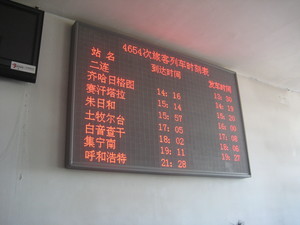
If you read my blog on a regular basis, you will know that I traveled through Russia, Mongolia and China last year. If there's one big thing I learned on this trip, it's this: English language is - on a worldwide scale - much less prevalent than I thought. Call me a fool, but I just wasn't aware of that. I thought, okay, maybe many people won't understand English, but at least I'll always be able to find someone nearby who's able to translate. That just wasn't the case. I spent days in cities where I met nobody that shared any language knowledge with me.
I'm pretty sure that translation technologies will become really important in the not-so-distant future. For many people, they already are. I've learned about the opinions of swedish initiatives without any knowledge of swedish just by using Google translate. Google Chrome and the free variant Chromium show directly the option to send something through Google translate if it detects that it's not in your language (although that wasn't working with Mongolian when I was there last year). I was in hotels where the staff pointed me to their PC with an instance of Yandex translate or Baidu translate where I should type in my questions in English (Yandex is something like the russian Google, Baidu is something like the chinese Google). Despite all the shortcomings of today's translation services, people use them to circumvent language barriers.
Young people in those countries are often learning English today, but it's a matter of fact that this will only very slowly translate into a real change. Lots of barriers exist. Many countries have their own language and another language that's used as the "international communication language" that's not English. For example, you'll probably get along pretty well in most post-soviet countries with Russian, no matter if the countries have their own native language or not. This also happens in single countries with more than one language. People have their native language and learn the countries language as their first foreign language.
Some people think their language is especially important and this stops the adoption of English (France is especially known for that). Some people have the strange idea that supporting English language knowledge is equivalent to supporting US politics and therefore oppose it.
Yes, one can try to learn more languages (I'm trying it with Mandarin myself and if I'll ever feel I can try a fourth language it'll probably be Russian), but if you look on the world scale, it's a loosing battle. To get along worldwide, you'd probably have to learn at least five languages. If you are fluent in English, Mandarin, Russian, Arabic and Spanish, you're probably quite good, but I doubt there are many people on this planet able to do that. If you're one of them, you have my deepest respect (please leave a comment if you are).
If you'd pick two completely random people of the world population, it's quite likely that they don't share a common language.
I see no reason in principle why technology can't solve that. We're probably far away from a StarTrek-alike universal translator and sadly evolution hasn't brought us the Babelfish yet, but I'm pretty confident that we will see rapid improvements in this area and that will change a lot. This may sound somewhat pathetic, but I think this could be a crucial issue in fixing some of the big problems of our world - hate, racism, war. It's just plain simple: If you have friends in China, you're less likely to think that "the chinese people are bad" (I'm using this example because I feel this thought is especially prevalent amongst the left-alternative people who would never admit any racist thoughts - but that's probably a topic for a blog entry on its own). If you have friends in Iran, you're less likely to support your country fighting a war against Iran. But having friends requires being able to communicate with them. Being able to have friends without the necessity of a common language is a fascinating thought to me.
Friday, February 29. 2008
merkaartor, another editor for OpenStreetMap
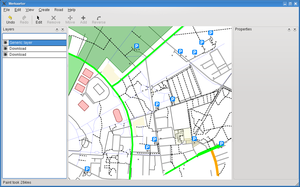 After some more »out of memory«-messages by josm, I thought it's time to look out for alternatives.
For the openstreetmap-project, the two main editors are josm (java) and potlach (flash). I think using java probably wasn't a very wise decision (I still wonder how an app can get »out of memory« after loading about 5 MB of images, do they create a pixel class and store every pixel in an object?) and I don't like flash either.
There's another project called merkaartor and today I had a look. My first feeling is that it's promising. It has good performance, it does nice live-rendering and it supports the basic features (adding nodes and ways, up/downloading stuff to the osm-system).
Sure, comparing to the large list of plugin features josm has, it's limited. Maybe I'll try to hack in some bits I'm missing at the moment.
In my continuing effort to improve gentoo for geo-related stuff, I've just added a merkaartor package to portage.
Tuesday, February 26. 2008
Manually decrypting S/MIME mails
Cross Site Scripting (XSS) in the backend and in the installer
Friday, February 15. 2008
Time-syncing external devices like cameras, mobiles
Wednesday, May 2. 2007
Zeitgeist
Quicksearch
About me
You can find my web page with links to my work as a journalist at https://hboeck.de/.
You may also find my newsletter about climate change and decarbonization technologies interesting.
Hanno Böck
mail: hanno@hboeck.de
Hanno on Mastodon
Impressum

You may also find my newsletter about climate change and decarbonization technologies interesting.
Hanno Böck
mail: hanno@hboeck.de
Hanno on Mastodon
Impressum
Creative Commons

Unless noted otherwise, all content is CC Zero / public domain
