Entries tagged as encryption
aead aes cfb owncloud security vulnerability aok datenschutz email gpg pgp privacy verschlüsselung apache certificates cryptography datensparsamkeit grsecurity https itsecurity javascript karlsruhe letsencrypt linux mod_rewrite nginx ocsp ocspstapling openssl php revocation serendipity sni ssl symlink tls userdir vortrag web web20 webhosting webmontag websecurity berserk bleichenbacher chrome firefox nss poodle braunschweig bsideshn ccc cdu easterhegg gerthoffmann hannover internetausdrucker netzpolitik piratenpartei talk überwachung browser ajax certificate clickjacking content-security-policy csp dell edellroot html khtml konqueror maninthemiddle microsoft rss superfish webcore xss ca cacert certificateauthority hash md5 privatekey rsa sha1 sha2 sha256 symantec transvalid x509 aiglx blog calendar come2linux compiz eff english essen games ipv6 kubik ludwigsburg lug lugbk observatory openstreetmap planet rc2 schokokeks simplesharingextensions smime stadtmitte webinale wine xgl 23c3 24c3 4k assembler berlin bewußtsein c4 cctv copyright darmstadt drm dvb entropia freesoftware gpn gpn5 gpn6 gpn7 hacker jugendumweltbewegung jukss kongress königswusterhausen licenses mrmcd mrmcd100b mrmcd101b mysmartgrid ökologie papierlos passwörter philosophie programmieren programming publicdomain querfunk radio rsaoaep rsapss science server slides stuttgart surveillance theory tpm überwachungskameras unicode utf-8 wahl wahlcomputer wahlmaschinen wiesbaden wiki algorithm android cccamp11 cloudflare facebook openleaks pss taz updates windowsxp chromium crash diffiehellman forwardsecrecy keyexchange cms joomla update apt cccamp cccamp15 cmi crypto deb debian deolalikar diploma diplomarbeit enigma fedora gentoo gnupg gsoc http key keyserver libressl math milleniumproblems mitm modulobias nist openbsd openpgp packagemanagement password pnp provablesecurity random revoke rpm schlüssel sha512 signatures thesis ubuntu university wordpress 129a adresse agb antigenozidbewegung ard bahn bundestag bundesverfassungsgericht bürgerrechte bverfg datamining dataretention db demonstration diy einkaufen fernsehen frankfurt freedomnotfear freiheitstattangst fricard gez hausdurchsuchung humanistischeunion ice innenpolitik jugendschutz justiz kamera kameraüberwachung köln metis mobil ninahagen optoutday ör osm peterschaar privatsphäre re-publica re-publica09 rechtsbeugung reklame religion rfid richtervorbehalt rp09 schäuble spam steuerid steuernummer thermen topberlin uni verfassungsgericht verschwörungstheorien verwertungsgesellschaft vgwort videoüberwachung vorratsdatenspeicherung werbung wga zdf zigaretten zigarettenautomaten abuse boranet botnet ddos etymologie lg ncable sprache virus cve ffmpeg flash flv ftp ghost glibc gstreamer mozilla mplayer multimedia redhat video vlc xine xsa youtube zzuf gajim instantmessaging jabber otr tictactoe xmpp factoring adguard antivirus breach cookies crime csrf freak heist kaspersky komodia netfiltersdk privdog protocolfilters samesite time addresssanitizer afl americanfuzzylop bash bufferoverflow fuzzing heartbleed shellshock bugtracker github leak nextcloud cbc gnutls luckythirteen padding 27c3 cellular frequency fsfe gsm lessig mobilephones openbsc openbts osmocombb wiretapping feed harvester 0days adobe afra altushost antivir asan auskunftsanspruch axfr azure barcamp bias bigbluebutton bodensee botnetz bsi bugbounty bundesdatenschutzgesetz bundestrojaner busby bypass c chcounter clamav clang code conflictofinterest cookie dingens distributions dns domain drupal eplus fileexfiltration firewall freewvs gallery gcc gimp git gobi google hackerone hacking helma infoleak informationdisclosure internetscan ircbot jodconverter libreoffice malware mantis memorysafety mephisto moodle mpaa mysql napster nessus newspaper ntp ntpd onlinedurchsuchung openvas panda passwordalert passwort pdo phishing python rand rhein s9y salinecourier session shellbot sicherheit snallygaster sniffing sqlinjection squirrelmail staatsanwaltschaft stacktrace study subdomain sunras support tlsdate toendacms unicef useafterfree vulnerabilities webapps windows zerodays zugangsdaten bonn froscon froscon2007 siegburg core coredump segfault webroot webserver
Friday, May 19. 2017
The Problem with OCSP Stapling and Must Staple and why Certificate Revocation is still broken
Update (2020-09-16): While three years old, people still find this blog post when looking for information about Stapling problems. For Apache the situation has improved considerably in the meantime: mod_md, which is part of recent apache releases, comes with a new stapling implementation which you can enable with the setting MDStapling on.
Today the OCSP servers from Let’s Encrypt were offline for a while. This has caused far more trouble than it should have, because in theory we have all the technologies available to handle such an incident. However due to failures in how they are implemented they don’t really work.
We have to understand some background. Encrypted connections using the TLS protocol like HTTPS use certificates. These are essentially cryptographic public keys together with a signed statement from a certificate authority that they belong to a certain host name.
CRL and OCSP – two technologies that don’t work
Certificates can be revoked. That means that for some reason the certificate should no longer be used. A typical scenario is when a certificate owner learns that his servers have been hacked and his private keys stolen. In this case it’s good to avoid that the stolen keys and their corresponding certificates can still be used. Therefore a TLS client like a browser should check that a certificate provided by a server is not revoked.
That’s the theory at least. However the history of certificate revocation is a history of two technologies that don’t really work.
One method are certificate revocation lists (CRLs). It’s quite simple: A certificate authority provides a list of certificates that are revoked. This has an obvious limitation: These lists can grow. Given that a revocation check needs to happen during a connection it’s obvious that this is non-workable in any realistic scenario.
The second method is called OCSP (Online Certificate Status Protocol). Here a client can query a server about the status of a single certificate and will get a signed answer. This avoids the size problem of CRLs, but it still has a number of problems. Given that connections should be fast it’s quite a high cost for a client to make a connection to an OCSP server during each handshake. It’s also concerning for privacy, as it gives the operator of an OCSP server a lot of information.
However there’s a more severe problem: What happens if an OCSP server is not available? From a security point of view one could say that a certificate that can’t be OCSP-checked should be considered invalid. However OCSP servers are far too unreliable. So practically all clients implement OCSP in soft fail mode (or not at all). Soft fail means that if the OCSP server is not available the certificate is considered valid.
That makes the whole OCSP concept pointless: If an attacker tries to abuse a stolen, revoked certificate he can just block the connection to the OCSP server – and thus a client can’t learn that it’s revoked. Due to this inherent security failure Chrome decided to disable OCSP checking altogether. As a workaround they have something called CRLsets and Mozilla has something similar called OneCRL, which is essentially a big revocation list for important revocations managed by the browser vendor. However this is a weak workaround that doesn’t cover most certificates.
OCSP Stapling and Must Staple to the rescue?
There are two technologies that could fix this: OCSP Stapling and Must-Staple.
OCSP Stapling moves the querying of the OCSP server from the client to the server. The server gets OCSP replies and then sends them within the TLS handshake. This has several advantages: It avoids the latency and privacy implications of OCSP. It also allows surviving short downtimes of OCSP servers, because a TLS server can cache OCSP replies (they’re usually valid for several days).
However it still does not solve the security issue: If an attacker has a stolen, revoked certificate it can be used without Stapling. The browser won’t know about it and will query the OCSP server, this request can again be blocked by the attacker and the browser will accept the certificate.
Therefore an extension for certificates has been introduced that allows us to require Stapling. It’s usually called OCSP Must-Staple and is defined in RFC 7633 (although the RFC doesn’t mention the name Must-Staple, which can cause some confusion). If a browser sees a certificate with this extension that is used without OCSP Stapling it shouldn’t accept it.
So we should be fine. With OCSP Stapling we can avoid the latency and privacy issues of OCSP and we can avoid failing when OCSP servers have short downtimes. With OCSP Must-Staple we fix the security problems. No more soft fail. All good, right?
The OCSP Stapling implementations of Apache and Nginx are broken
Well, here come the implementations. While a lot of protocols use TLS, the most common use case is the web and HTTPS. According to Netcraft statistics by far the biggest share of active sites on the Internet run on Apache (about 46%), followed by Nginx (about 20 %). It’s reasonable to say that if these technologies should provide a solution for revocation they should be usable with the major products in that area. On the server side this is only OCSP Stapling, as OCSP Must Staple only needs to be checked by the client.
What would you expect from a working OCSP Stapling implementation? It should try to avoid a situation where it’s unable to send out a valid OCSP response. Thus roughly what it should do is to fetch a valid OCSP response as soon as possible and cache it until it gets a new one or it expires. It should furthermore try to fetch a new OCSP response long before the old one expires (ideally several days). And it should never throw away a valid response unless it has a newer one. Google developer Ryan Sleevi wrote a detailed description of what a proper OCSP Stapling implementation could look like.
Apache does none of this.
If Apache tries to renew the OCSP response and gets an error from the OCSP server – e. g. because it’s currently malfunctioning – it will throw away the existing, still valid OCSP response and replace it with the error. It will then send out stapled OCSP errors. Which makes zero sense. Firefox will show an error if it sees this. This has been reported in 2014 and is still unfixed.
Now there’s an option in Apache to avoid this behavior: SSLStaplingReturnResponderErrors. It’s defaulting to on. If you switch it off you won’t get sane behavior (that is – use the still valid, cached response), instead Apache will disable Stapling for the time it gets errors from the OCSP server. That’s better than sending out errors, but it obviously makes using Must Staple a no go.
It gets even crazier. I have set this option, but this morning I still got complaints that Firefox users were seeing errors. That’s because in this case the OCSP server wasn’t sending out errors, it was completely unavailable. For that situation Apache has a feature that will fake a tryLater error to send out to the client. If you’re wondering how that makes any sense: It doesn’t. The “tryLater” error of OCSP isn’t useful at all in TLS, because you can’t try later during a handshake which only lasts seconds.
This is controlled by another option: SSLStaplingFakeTryLater. However if we read the documentation it says “Only effective if SSLStaplingReturnResponderErrors is also enabled.” So if we disabled SSLStapingReturnResponderErrors this shouldn’t matter, right? Well: The documentation is wrong.
There are more problems: Apache doesn’t get the OCSP responses on startup, it only fetches them during the handshake. This causes extra latency on the first connection and increases the risk of hitting a situation where you don’t have a valid OCSP response. Also cached OCSP responses don’t survive server restarts, they’re kept in an in-memory cache.
There’s currently no way to configure Apache to handle OCSP stapling in a reasonable way. Here’s the configuration I use, which will at least make sure that it won’t send out errors and cache the responses a bit longer than it does by default:
I’m less familiar with Nginx, but from what I hear it isn’t much better either. According to this blogpost it doesn’t fetch OCSP responses on startup and will send out the first TLS connections without stapling even if it’s enabled. Here’s a blog post that recommends to work around this by connecting to all configured hosts after the server has started.
To summarize: This is all a big mess. Both Apache and Nginx have OCSP Stapling implementations that are essentially broken. As long as you’re using either of those then enabling Must-Staple is a reliable way to shoot yourself in the foot and get into trouble. Don’t enable it if you plan to use Apache or Nginx.
Certificate revocation is broken. It has been broken since the invention of SSL and it’s still broken. OCSP Stapling and OCSP Must-Staple could fix it in theory. But that would require working and stable implementations in the most widely used server products.
Today the OCSP servers from Let’s Encrypt were offline for a while. This has caused far more trouble than it should have, because in theory we have all the technologies available to handle such an incident. However due to failures in how they are implemented they don’t really work.
We have to understand some background. Encrypted connections using the TLS protocol like HTTPS use certificates. These are essentially cryptographic public keys together with a signed statement from a certificate authority that they belong to a certain host name.
CRL and OCSP – two technologies that don’t work
Certificates can be revoked. That means that for some reason the certificate should no longer be used. A typical scenario is when a certificate owner learns that his servers have been hacked and his private keys stolen. In this case it’s good to avoid that the stolen keys and their corresponding certificates can still be used. Therefore a TLS client like a browser should check that a certificate provided by a server is not revoked.
That’s the theory at least. However the history of certificate revocation is a history of two technologies that don’t really work.
One method are certificate revocation lists (CRLs). It’s quite simple: A certificate authority provides a list of certificates that are revoked. This has an obvious limitation: These lists can grow. Given that a revocation check needs to happen during a connection it’s obvious that this is non-workable in any realistic scenario.
The second method is called OCSP (Online Certificate Status Protocol). Here a client can query a server about the status of a single certificate and will get a signed answer. This avoids the size problem of CRLs, but it still has a number of problems. Given that connections should be fast it’s quite a high cost for a client to make a connection to an OCSP server during each handshake. It’s also concerning for privacy, as it gives the operator of an OCSP server a lot of information.
However there’s a more severe problem: What happens if an OCSP server is not available? From a security point of view one could say that a certificate that can’t be OCSP-checked should be considered invalid. However OCSP servers are far too unreliable. So practically all clients implement OCSP in soft fail mode (or not at all). Soft fail means that if the OCSP server is not available the certificate is considered valid.
That makes the whole OCSP concept pointless: If an attacker tries to abuse a stolen, revoked certificate he can just block the connection to the OCSP server – and thus a client can’t learn that it’s revoked. Due to this inherent security failure Chrome decided to disable OCSP checking altogether. As a workaround they have something called CRLsets and Mozilla has something similar called OneCRL, which is essentially a big revocation list for important revocations managed by the browser vendor. However this is a weak workaround that doesn’t cover most certificates.
OCSP Stapling and Must Staple to the rescue?
There are two technologies that could fix this: OCSP Stapling and Must-Staple.
OCSP Stapling moves the querying of the OCSP server from the client to the server. The server gets OCSP replies and then sends them within the TLS handshake. This has several advantages: It avoids the latency and privacy implications of OCSP. It also allows surviving short downtimes of OCSP servers, because a TLS server can cache OCSP replies (they’re usually valid for several days).
However it still does not solve the security issue: If an attacker has a stolen, revoked certificate it can be used without Stapling. The browser won’t know about it and will query the OCSP server, this request can again be blocked by the attacker and the browser will accept the certificate.
Therefore an extension for certificates has been introduced that allows us to require Stapling. It’s usually called OCSP Must-Staple and is defined in RFC 7633 (although the RFC doesn’t mention the name Must-Staple, which can cause some confusion). If a browser sees a certificate with this extension that is used without OCSP Stapling it shouldn’t accept it.
So we should be fine. With OCSP Stapling we can avoid the latency and privacy issues of OCSP and we can avoid failing when OCSP servers have short downtimes. With OCSP Must-Staple we fix the security problems. No more soft fail. All good, right?
The OCSP Stapling implementations of Apache and Nginx are broken
Well, here come the implementations. While a lot of protocols use TLS, the most common use case is the web and HTTPS. According to Netcraft statistics by far the biggest share of active sites on the Internet run on Apache (about 46%), followed by Nginx (about 20 %). It’s reasonable to say that if these technologies should provide a solution for revocation they should be usable with the major products in that area. On the server side this is only OCSP Stapling, as OCSP Must Staple only needs to be checked by the client.
What would you expect from a working OCSP Stapling implementation? It should try to avoid a situation where it’s unable to send out a valid OCSP response. Thus roughly what it should do is to fetch a valid OCSP response as soon as possible and cache it until it gets a new one or it expires. It should furthermore try to fetch a new OCSP response long before the old one expires (ideally several days). And it should never throw away a valid response unless it has a newer one. Google developer Ryan Sleevi wrote a detailed description of what a proper OCSP Stapling implementation could look like.
Apache does none of this.
If Apache tries to renew the OCSP response and gets an error from the OCSP server – e. g. because it’s currently malfunctioning – it will throw away the existing, still valid OCSP response and replace it with the error. It will then send out stapled OCSP errors. Which makes zero sense. Firefox will show an error if it sees this. This has been reported in 2014 and is still unfixed.
Now there’s an option in Apache to avoid this behavior: SSLStaplingReturnResponderErrors. It’s defaulting to on. If you switch it off you won’t get sane behavior (that is – use the still valid, cached response), instead Apache will disable Stapling for the time it gets errors from the OCSP server. That’s better than sending out errors, but it obviously makes using Must Staple a no go.
It gets even crazier. I have set this option, but this morning I still got complaints that Firefox users were seeing errors. That’s because in this case the OCSP server wasn’t sending out errors, it was completely unavailable. For that situation Apache has a feature that will fake a tryLater error to send out to the client. If you’re wondering how that makes any sense: It doesn’t. The “tryLater” error of OCSP isn’t useful at all in TLS, because you can’t try later during a handshake which only lasts seconds.
This is controlled by another option: SSLStaplingFakeTryLater. However if we read the documentation it says “Only effective if SSLStaplingReturnResponderErrors is also enabled.” So if we disabled SSLStapingReturnResponderErrors this shouldn’t matter, right? Well: The documentation is wrong.
There are more problems: Apache doesn’t get the OCSP responses on startup, it only fetches them during the handshake. This causes extra latency on the first connection and increases the risk of hitting a situation where you don’t have a valid OCSP response. Also cached OCSP responses don’t survive server restarts, they’re kept in an in-memory cache.
There’s currently no way to configure Apache to handle OCSP stapling in a reasonable way. Here’s the configuration I use, which will at least make sure that it won’t send out errors and cache the responses a bit longer than it does by default:
SSLStaplingCache shmcb:/var/tmp/ocsp-stapling-cache/cache(128000000)

SSLUseStapling on

SSLStaplingResponderTimeout 2

SSLStaplingReturnResponderErrors off

SSLStaplingFakeTryLater off

SSLStaplingStandardCacheTimeout 86400
I’m less familiar with Nginx, but from what I hear it isn’t much better either. According to this blogpost it doesn’t fetch OCSP responses on startup and will send out the first TLS connections without stapling even if it’s enabled. Here’s a blog post that recommends to work around this by connecting to all configured hosts after the server has started.
To summarize: This is all a big mess. Both Apache and Nginx have OCSP Stapling implementations that are essentially broken. As long as you’re using either of those then enabling Must-Staple is a reliable way to shoot yourself in the foot and get into trouble. Don’t enable it if you plan to use Apache or Nginx.
Certificate revocation is broken. It has been broken since the invention of SSL and it’s still broken. OCSP Stapling and OCSP Must-Staple could fix it in theory. But that would require working and stable implementations in the most widely used server products.
Friday, July 15. 2016
Insecure updates in Joomla before 3.6
Monday, April 4. 2016
Pwncloud – bad crypto in the Owncloud encryption module
 The Owncloud web application has an encryption module. I first became aware of it when a press release was published advertising this encryption module containing this:
“Imagine you are an IT organization using industry standard AES 256 encryption keys. Let’s say that a vulnerability is found in the algorithm, and you now need to improve your overall security by switching over to RSA-2048, a completely different algorithm and key set. Now, with ownCloud’s modular encryption approach, you can swap out the existing AES 256 encryption with the new RSA algorithm, giving you added security while still enabling seamless access to enterprise-class file sharing and collaboration for all of your end-users.”
To anyone knowing anything about crypto this sounds quite weird. AES and RSA are very different algorithms – AES is a symmetric algorithm and RSA is a public key algorithm - and it makes no sense to replace one by the other. Also RSA is much older than AES. This press release has since been removed from the Owncloud webpage, but its content can still be found in this Reuters news article. This and some conversations with Owncloud developers caused me to have a look at this encryption module.
First it is important to understand what this encryption module is actually supposed to do and understand the threat scenario. The encryption provides no security against a malicious server operator, because the encryption happens on the server. The only scenario where this encryption helps is if one has a trusted server that is using an untrusted storage space.
When one uploads a file with the encryption module enabled it ends up under the same filename in the user's directory on the file storage. Now here's a first, quite obvious problem: The filename itself is not protected, so an attacker that is assumed to be able to see the storage space can already learn something about the supposedly encrypted data.
The content of the file starts with this:
BEGIN:oc_encryption_module:OC_DEFAULT_MODULE:cipher:AES-256-CFB:HEND----It is then padded with further dashes until position 0x2000 and then the encrypted contend follows Base64-encoded in blocks of 8192 bytes. The header tells us what encryption algorithm and mode is used: AES-256 in CFB-mode. CFB stands for Cipher Feedback.
Authenticated and unauthenticated encryption modes
In order to proceed we need some basic understanding of encryption modes. AES is a block cipher with a block size of 128 bit. That means we cannot just encrypt arbitrary input with it, the algorithm itself only encrypts blocks of 128 bit (or 16 byte) at a time. The naive way to encrypt more data is to split it into 16 byte blocks and encrypt every block. This is called Electronic Codebook mode or ECB and it should never be used, because it is completely insecure.
Common modes for encryption are Cipherblock Chaining (CBC) and Counter mode (CTR). These modes are unauthenticated and have a property that's called malleability. This means an attacker that is able to manipulate encrypted data is able to manipulate it in a way that may cause a certain defined behavior in the output. Often this simply means an attacker can flip bits in the ciphertext and the same bits will be flipped in the decrypted data.
To counter this these modes are usually combined with some authentication mechanism, a common one is called HMAC. However experience has shown that this combining of encryption and authentication can go wrong. Many vulnerabilities in both TLS and SSH were due to bad combinations of these two mechanism. Therefore modern protocols usually use dedicated authenticated encryption modes (AEADs), popular ones include Galois/Counter-Mode (GCM), Poly1305 and OCB.
Cipher Feedback (CFB) mode is a self-correcting mode. When an error happens, which can be simple data transmission error or a hard disk failure, two blocks later the decryption will be correct again. This also allows decrypting parts of an encrypted data stream. But the crucial thing for our attack is that CFB is not authenticated and malleable. And Owncloud didn't use any authentication mechanism at all.
Therefore the data is encrypted and an attacker cannot see the content of a file (however he learns some metadata: the size and the filename), but an Owncloud user cannot be sure that the downloaded data is really the data that was uploaded in the first place. The malleability of CFB mode works like this: An attacker can flip arbitrary bits in the ciphertext, the same bit will be flipped in the decrypted data. However if he flips a bit in any block then the following block will contain unpredictable garbage.
Backdooring an EXE file
How does that matter in practice? Let's assume we have a group of people that share a software package over Owncloud. One user uploads a Windows EXE installer and the others download it from there and install it. Let's further assume that the attacker doesn't know the content of the EXE file (this is a generous assumption, in many cases he will know, as he knows the filename).
EXE files start with a so-called MZ-header, which is the old DOS EXE header that gets usually ignored. At a certain offset (0x3C), which is at the end of the fourth 16 byte block, there is an address of the PE header, which on Windows systems is the real EXE header. After the MZ header even on modern executables there is still a small DOS program. This starts with the fifth 16 byte block. This DOS program usually only shows the message “Th is program canno t be run in DOS mode”. And this DOS stub program is almost always the exactly the same.
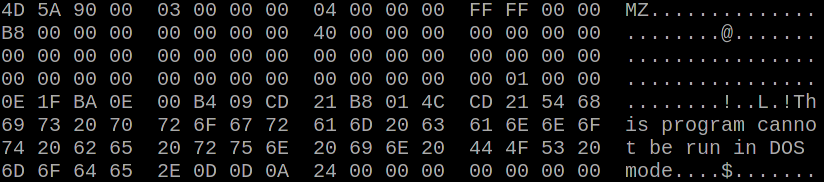
Therefore our attacker can do the following: First flip any non-relevant bit in the third 16 byte block. This will cause the fourth block to contain garbage. The fourth block contains the offset of the PE header. As this is now garbled Windows will no longer consider this executable to be a Windows application and will therefore execute the DOS stub.
The attacker can then XOR 16 bytes of his own code with the first 16 bytes of the standard DOS stub code. He then XORs the result with the fifth block of the EXE file where he expects the DOS stub to be. Voila: The resulting decrypted EXE file will contain 16 bytes of code controlled by the attacker.
I created a proof of concept of this attack. This isn't enough to launch a real attack, because an attacker only has 16 bytes of DOS assembler code, which is very little. For a real attack an attacker would have to identify further pieces of the executable that are predictable and jump through the code segments.
The first fix
I reported this to Owncloud via Hacker One in January. The first fix they proposed was a change where they used Counter-Mode (CTR) in combination with HMAC. They still encrypt the file in blocks of 8192 bytes size. While this is certainly less problematic than the original construction it still had an obvious problem: All the 8192 bytes sized file blocks where encrypted the same way. Therefore an attacker can swap or remove chunks of a file. The encryption is still malleable.
The second fix then included a counter of the file and also avoided attacks where an attacker can go back to an earlier version of a file. This solution is shipped in Owncloud 9.0, which has recently been released.
Is this new construction secure? I honestly don't know. It is secure enough that I didn't find another obvious flaw in it, but that doesn't mean a whole lot.
You may wonder at this point why they didn't switch to an authenticated encryption mode like GCM. The reason for that is that PHP doesn't support any authenticated encryption modes. There is a proposal and most likely support for authenticated encryption will land in PHP 7.1. However given that using outdated PHP versions is a very widespread practice it will probably take another decade till anyone can use that in mainstream web applications.
Don't invent your own crypto protocols
The practical relevance of this vulnerability is probably limited, because the scenario that it protects from is relatively obscure. But I think there is a lesson to learn here. When people without a strong cryptographic background create ad-hoc designs of cryptographic protocols it will almost always go wrong.
It is widely known that designing your own crypto algorithms is a bad idea and that you should use standardized and well tested algorithms like AES. But using secure algorithms doesn't automatically create a secure protocol. One has to know the interactions and limitations of crypto primitives and this is far from trivial. There is a worrying trend – especially since the Snowden revelations – that new crypto products that never saw any professional review get developed and advertised in masses. A lot of these products are probably extremely insecure and shouldn't be trusted at all.
If you do crypto you should either do it right (which may mean paying someone to review your design or to create it in the first place) or you better don't do it at all. People trust your crypto, and if that trust isn't justified you shouldn't ship a product that creates the impression it contains secure cryptography.
There's another thing that bothers me about this. Although this seems to be a pretty standard use case of crypto – you have a symmetric key and you want to encrypt some data – there is no straightforward and widely available standard solution for it. Using authenticated encryption solves a number of issues, but not all of them (this talk by Adam Langley covers some interesting issues and caveats with authenticated encryption).
The proof of concept can be found on Github. I presented this vulnerability in a talk at the Easterhegg conference, a video recording is available.
Update (2020): Kevin Niehage had a much more detailed look at the encryption module of Owncloud and its fork Nextcloud. Among other things he noted that a downgrade attack allows re-enabling the attack I described. He found several other design flaws and bad design decisions and has written a paper about it.
Monday, November 23. 2015
Superfish 2.0: Dangerous Certificate on Dell Laptops breaks encrypted HTTPS Connections
 tl;dr Dell laptops come preinstalled with a root certificate and a corresponding private key. That completely compromises the security of encrypted HTTPS connections. I've provided an online check, affected users should delete the certificate.
It seems that Dell hasn't learned anything from the Superfish-scandal earlier this year: Laptops from the company come with a preinstalled root certificate that will be accepted by browsers. The private key is also installed on the system and has been published now. Therefore attackers can use Man in the Middle attacks against Dell users to show them manipulated HTTPS webpages or read their encrypted data.
The certificate, which is installed in the system's certificate store under the name "eDellRoot", gets installed by a software called Dell Foundation Services. This software is still available on Dell's webpage. According to the somewhat unclear description from Dell it is used to provide "foundational services facilitating customer serviceability, messaging and support functions".
The private key of this certificate is marked as non-exportable in the Windows certificate store. However this provides no real protection, there are Tools to export such non-exportable certificate keys. A user of the plattform Reddit has posted the Key there.
For users of the affected Laptops this is a severe security risk. Every attacker can use this root certificate to create valid certificates for arbitrary web pages. Even HTTP Public Key Pinning (HPKP) does not protect against such attacks, because browser vendors allow locally installed certificates to override the key pinning protection. This is a compromise in the implementation that allows the operation of so-called TLS interception proxies.
I was made aware of this issue a while ago by Kristof Mattei. We asked Dell for a statement three weeks ago and didn't get any answer.
It is currently unclear which purpose this certificate served. However it seems unliklely that it was placed there deliberately for surveillance purposes. In that case Dell wouldn't have installed the private key on the system.
Affected are only users that use browsers or other applications that use the system's certificate store. Among the common Windows browsers this affects the Internet Explorer, Edge and Chrome. Not affected are Firefox-users, Mozilla's browser has its own certificate store.
Users of Dell laptops can check if they are affected with an online check tool. Affected users should immediately remove the certificate in the Windows certificate manager. The certificate manager can be started by clicking "Start" and typing in "certmgr.msc". The "eDellRoot" certificate can be found under "Trusted Root Certificate Authorities". You also need to remove the file Dell.Foundation.Agent.Plugins.eDell.dll, Dell has now posted an instruction and a removal tool.
This incident is almost identical with the Superfish-incident. Earlier this year it became public that Lenovo had preinstalled a software called Superfish on its Laptops. Superfish intercepts HTTPS-connections to inject ads. It used a root certificate for that and the corresponding private key was part of the software. After that incident several other programs with the same vulnerability were identified, they all used a software module called Komodia. Similar vulnerabilities were found in other software products, for example in Privdog and in the ad blocker Adguard.
This article is mostly a translation of a German article I wrote for Golem.de.
Image source and license: Wistula / Wikimedia Commons, Creative Commons by 3.0
Update (2015-11-24): Second Dell root certificate DSDTestProvider
I just found out that there is a second root certificate installed with some Dell software that causes exactly the same issue. It is named DSDTestProvider and comes with a software called Dell System Detect. Unlike the Dell Foundations Services this one does not need a Dell computer to be installed, therefore it was trivial to extract the certificate and the private key. My online test now checks both certificates. This new certificate is not covered by Dell's removal instructions yet.
Dell has issued an official statement on their blog and in the comment section a user mentioned this DSDTestProvider certificate. After googling what DSD might be I quickly found it. There have been concerns about the security of Dell System Detect before, Malwarebytes has an article about it from April mentioning that it was vulnerable to a remote code execution vulnerability.
Update (2015-11-26): Service tag information disclosure
Another unrelated issue on Dell PCs was discovered in a tool called Dell Foundation Services. It allows webpages to read an unique service tag. There's also an online check.
Sunday, March 15. 2015
Talks at BSidesHN about PGP keyserver data and at Easterhegg about TLS
Tuesday, November 4. 2014
Dancing protocols, POODLEs and other tales from TLS

The latest SSL attack was called POODLE. Image source
.
I think it is crucial to understand what led to these vulnerabilities. I find POODLE and BERserk so interesting because these two vulnerabilities were both unnecessary and could've been avoided by intelligent design choices. Okay, let's start by investigating what went wrong.
The mess with CBC
POODLE (Padding Oracle On Downgraded Legacy Encryption) is a weakness in the CBC block mode and the padding of the old SSL protocol. If you've followed previous stories about SSL/TLS vulnerabilities this shouldn't be news. There have been a whole number of CBC-related vulnerabilities, most notably the Padding oracle (2003), the BEAST attack (2011) and the Lucky Thirteen attack (2013) (Lucky Thirteen is kind of my favorite, because it was already more or less mentioned in the TLS 1.2 standard). The POODLE attack builds on ideas already used in previous attacks.
CBC is a so-called block mode. For now it should be enough to understand that we have two kinds of ciphers we use to authenticate and encrypt connections – block ciphers and stream ciphers. Block ciphers need a block mode to operate. There's nothing necessarily wrong with CBC, it's the way CBC is used in SSL/TLS that causes problems. There are two weaknesses in it: Early versions (before TLS 1.1) use a so-called implicit Initialization Vector (IV) and they use a method called MAC-then-Encrypt (used up until the very latest TLS 1.2, but there's a new extension to fix it) which turned out to be quite fragile when it comes to security. The CBC details would be a topic on their own and I won't go into the details now. The long-term goal should be to get rid of all these (old-style) CBC modes, however that won't be possible for quite some time due to compatibility reasons. As most of these problems have been known since 2003 it's about time.
The evil Protocol Dance
The interesting question with POODLE is: Why does a security issue in an ancient protocol like SSLv3 bother us at all? SSL was developed by Netscape in the mid 90s, it has two public versions: SSLv2 and SSLv3. In 1999 (15 years ago) the old SSL was deprecated and replaced with TLS 1.0 standardized by the IETF. Now people still used SSLv3 up until very recently mostly for compatibility reasons. But even that in itself isn't the problem. SSL/TLS has a mechanism to safely choose the best protocol available. In a nutshell it works like this:
a) A client (e. g. a browser) connects to a server and may say something like "I want to connect with TLS 1.2“
b) The server may answer "No, sorry, I don't understand TLS 1.2, can you please connect with TLS 1.0?“
c) The client says "Ok, let's connect with TLS 1.0“
The point here is: Even if both server and client support the ancient SSLv3, they'd usually not use it. But this is the idealized world of standards. Now welcome to the real world, where things like this happen:
a) A client (e. g. a browser) connects to a server and may say something like "I want to connect with TLS 1.2“
b) The server thinks "Oh, TLS 1.2, never heard of that. What should I do? I better say nothing at all...“
c) The browser thinks "Ok, server doesn't answer, maybe we should try something else. Hey, server, I want to connect with TLS 1.1“
d) The browser will retry all SSL versions down to SSLv3 till it can connect.

The Protocol Dance is a Dance with the Devil. Image source
I first encountered the Protocol Dance back in 2008. Back then I already used a technology called SNI (Server Name Indication) that allows to have multiple websites with multiple certificates on a single IP address. I regularly got complains from people who saw the wrong certificates on those SNI webpages. A bug report to Firefox and some analysis revealed the reason: The protocol downgrades don't just happen when servers don't answer to new protocol requests, they also can happen on faulty or weak internet connections. SSLv3 does not support SNI, so when a downgrade to SSLv3 happens you get the wrong certificate. This was quite frustrating: A compatibility feature that was purely there to support broken hardware caused my completely legit setup to fail every now and then.
But the more severe problem is this: The Protocol Dance will allow an attacker to force downgrades to older (less secure) protocols. He just has to stop connection attempts with the more secure protocols. And this is why the POODLE attack was an issue after all: The problem was not backwards compatibility. The problem was attacker-controlled backwards compatibility.
The idea that the Protocol Dance might be a security issue wasn't completely new either. At the Black Hat conference this year Antoine Delignat-Lavaud presented a variant of an attack he calls "Virtual Host Confusion“ where he relied on downgrading connections to force SSLv3 connections.
"Whoever breaks it first“ - principle
The Protocol Dance is an example for something that I feel is an unwritten rule of browser development today: Browser vendors don't want things to break – even if the breakage is the fault of someone else. So they add all kinds of compatibility technologies that are purely there to support broken hardware. The idea is: When someone introduced broken hardware at some point – and it worked because the brokenness wasn't triggered at that point – the broken stuff is allowed to stay and all others have to deal with it.
To avoid the Protocol Dance a new feature is now on its way: It's called SCSV and the idea is that the Protocol Dance is stopped if both the server and the client support this new protocol feature. I'm extremely uncomfortable with that solution because it just adds another layer of duct tape and increases the complexity of TLS which already is much too complex.
There's another recent example which is very similar: At some point people found out that BIG-IP load balancers by the company F5 had trouble with TLS connection attempts larger than 255 bytes. However it was later revealed that connection attempts bigger than 512 bytes also succeed. So a padding extension was invented and it's now widespread behaviour of TLS implementations to avoid connection attempts between 256 and 511 bytes. To make matters completely insane: It was later found out that there is other broken hardware – SMTP servers by Ironport – that breaks when the handshake is larger than 511 bytes.
I have a principle when it comes to fixing things: Fix it where its broken. But the browser world works differently. It works with the „whoever breaks it first defines the new standard of brokenness“-principle. This is partly due to an unhealthy competition between browsers. Unfortunately they often don't compete very well on the security level. What you'll constantly hear is that browsers can't break any webpages because that will lead to people moving to other browsers.
I'm not sure if I entirely buy this kind of reasoning. For a couple of months the support for the ftp protocol in Chrome / Chromium is broken. I'm no fan of plain, unencrypted ftp and its only legit use case – unauthenticated file download – can just as easily be fulfilled with unencrypted http, but there are a number of live ftp servers that implement a legit and working protocol. I like Chromium and it's my everyday browser, but for a while the broken ftp support was the most prevalent reason I tend to start Firefox. This little episode makes it hard for me to believe that they can't break connections to some (broken) ancient SSL servers. (I just noted that the very latest version of Chromium has fixed ftp support again.)
BERserk, small exponents and PKCS #1 1.5

We have a problem with weak keys. Image source
BERserk is actually a variant of a quite old vulnerability (you may begin to see a pattern here): The Bleichenbacher attack on RSA first presented at Crypto 2006. Now here things get confusing, because the cryptographer Daniel Bleichenbacher found two independent vulnerabilities in RSA. One in the RSA encryption in 1998 and one in RSA signatures in 2006, for convenience I'll call them BB98 (encryption) and BB06 (signatures). Both of these vulnerabilities expose faulty implementations of the old RSA standard PKCS #1 1.5. And both are what I like to call "zombie vulnerabilities“. They keep coming back, no matter how often you try to fix them. In April the BB98 vulnerability was re-discovered in the code of Java and it was silently fixed in OpenSSL some time last year.
But BERserk is about the other one: BB06. BERserk exposes the fact that inside the RSA function an algorithm identifier for the used hash function is embedded and its encoded with BER. BER is part of ASN.1. I could tell horror stories about ASN.1, but I'll spare you that for now, maybe this is a topic for another blog entry. It's enough to know that it's a complicated format and this is what bites us here: With some trickery in the BER encoding one can add further data into the RSA function – and this allows in certain situations to create forged signatures.
One thing should be made clear: Both the original BB06 attack and BERserk are flaws in the implementation of PKCS #1 1.5. If you do everything correct then you're fine. These attacks exploit the relatively simple structure of the old PKCS standard and they only work when RSA is done with a very small exponent. RSA public keys consist of two large numbers. The modulus N (which is a product of two large primes) and the exponent.
In his presentation at Crypto 2006 Daniel Bleichenbacher already proposed what would have prevented this attack: Just don't use RSA keys with very small exponents like three. This advice also went into various recommendations (e. g. by NIST) and today almost everyone uses 65537 (the reason for this number is that due to its binary structure calculations with it are reasonably fast).
There's just one problem: A small number of keys are still there that use the exponent e=3. And six of them are used by root certificates installed in every browser. These root certificates are the trust anchor of TLS (which in itself is a problem, but that's another story). Here's our problem: As long as there is one single root certificate with e=3 with such an attack you can create as many fake certificates as you want. If we had deprecated e=3 keys BERserk would've been mostly a non-issue.
There is one more aspect of this story: What's this PKCS #1 1.5 thing anyway? It's an old standard for RSA encryption and signatures. I want to quote Adam Langley on the PKCS standards here: "In a modern light, they are all completely terrible. If you wanted something that was plausible enough to be widely implemented but complex enough to ensure that cryptography would forever be hamstrung by implementation bugs, you would be hard pressed to do better."
Now there's a successor to the PKCS #1 1.5 standard: PKCS #1 2.1, which is based on technologies called PSS (Probabilistic Signature Scheme) and OAEP (Optimal Asymmetric Encryption Padding). It's from 2002 and in many aspects it's much better. I am kind of a fan here, because I wrote my thesis about this. There's just one problem: Although already standardized 2002 people still prefer to use the much weaker old PKCS #1 1.5. TLS doesn't have any way to use the newer PKCS #1 2.1 and even the current drafts for TLS 1.3 stick to the older - and weaker - variant.
What to do
I would take bets that POODLE wasn't the last TLS/CBC-issue we saw and that BERserk wasn't the last variant of the BB06-attack. Basically, I think there are a number of things TLS implementers could do to prevent further similar attacks:
* The Protocol Dance should die. Don't put another layer of duct tape around it (SCSV), just get rid of it. It will break a small number of already broken devices, but that is a reasonable price for avoiding the next protocol downgrade attack scenario. Backwards compatibility shouldn't compromise security.
* More generally, I think the working around for broken devices has to stop. Replace the „whoever broke it first“ paradigm with a „fix it where its broken“ paradigm. That also means I think the padding extension should be scraped.
* Keys with weak choices need to be deprecated at some point. In a long process browsers removed most certificates with short 1024 bit keys. They're working hard on deprecating signatures with the weak SHA1 algorithm. I think e=3 RSA keys should be next on the list for deprecation.
* At some point we should deprecate the weak CBC modes. This is probably the trickiest part, because up until very recently TLS 1.0 was all that most major browsers supported. The only way to avoid them is either using the GCM mode of TLS 1.2 (most browsers just got support for that in recent months) or using a very new extension that's rarely used at all today.
* If we have better technologies we should start using them. PKCS #1 2.1 is clearly superior to PKCS #1 1.5, at least if new standards get written people should switch to it.
Update: I just read that Mozilla Firefox devs disabled the protocol dance in their latest nightly build. Let's hope others follow.
Friday, June 6. 2014
Enabling encryption by default and using HTTPS only
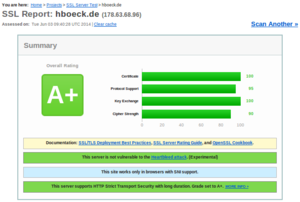 I recently switched my personal web page and my blog to deliver content exclusively encrypted via HTTPS. I want to take this opportunity to give some facts about enabling TLS encryption by default and problems you may face.
First of all the non-problems: Enabling HTTPS by default is almost never a significant performance problem. If people tell me that they can not possibly enable HTTPS due to performance reasons the first thing I ask is if they believe this or if they have real benchmark data showing this. If you don't believe me on that, I can quote Adam Langley from Google here: "In January this year (2010), Gmail switched to using HTTPS for everything by default. Previously it had been introduced as an option, but now all of our users use HTTPS to secure their email between their browsers and Google, all the time. In order to do this we had to deploy no additional machines and no special hardware. On our production frontend machines, SSL/TLS accounts for less than 1% of the CPU load, less than 10KB of memory per connection and less than 2% of network overhead."
Enabling HTTPS may cause a number of compatibility issues you may not instantly think about. First of all, we know that IPs in the IPv4 space are limited and expensive these days, so many people probably can't afford having a distinct IP for their web page. The solution to that is a TLS extension called SNI (Server Name Indication) which allows to have different certificates for different domain names on the same IP. It works in all major browsers and has been working for quite some time. The only major browser you'll face these days that doesn't support SNI is the Android 2.x browser.
There are some subtle issues with SNI. One is that browsers have fallback modes if they cannot connect via TLS and that may lead to a connection downgrade to SSLv3. And that ancient protocol doesn't support extensions and thus no SNI. So you may have irregular certificate errors if you are on a bad connection. A solution to that on the server side is to just disable SSLv3. It will make SNI much more reliable.
I don't really have a clear picture how many browsers will fail with SNI. There are probably a number of embedded devices out there like smart TVs with browsers or things alike that have problems. If you have any experiences feel free to post them in the comments.
The first issue I only noticed after I switched to HTTPS: I had an application called RSS Graffiti set up to automatically post all articles I write to a facebook fan page. After changing to HTTPS only it silently stopped working. Re-adding my feed didn't work. I now found a similar service called dlvr.it that I now use to post my RSS feed to facebook. I can only assume that this is a glimpse of a much bigger problem: There are probably tons of applications and online services out there not prepared for an encrypted Internet. If we want more people to deploy encryption by default we need to find these issues, document them and hopefully put enough pressure on their developers to fix them.
Another yet unfixed issue is the Yandex Bot. Yandex is a search engine and although you may never have heard of it it's probably one of the few companies in this area that can claim to be a serious competitor to Google. The reason you may not know it is that it's mostly operating in Russian language. Depending on who your page visitors are this may matter more or less.
The Yandex Bot speaks SSL but according to the Qualys SSL test it only supports the ancient SSLv3. So you have a choice between three possibilities: Don't enable HTTPS by default, enable HTTPS with a shitty configuration supporting ancient technology that will cause trouble for SNI or enable HTTPS with a sane configuration and get no traffic from the leading Russian search engine. None of them sounds very good to me.
Another issue is third party content. For security reasons today's browsers block all active HTTP content (CSS, JavaScript etc.) on HTTPS webpages. This isn't much of a problem for me, but it's a problem for webpages that rely on advertising because from what I hear most advertisement providers don't support HTTPS yet (Google being a laudable exception here). This is the main reason you won't see many news webpages enforcing HTTPS. However, I still have passive third party HTTP content on my blog. That's why you'll probably see a yellow warning sign in front of the URL in some browsers.
Saturday, January 19. 2013
How to configure your HTTPS server
Sunday, December 26. 2010
Goodbye 3DBD3B20, welcome BBB51E42
Thursday, March 5. 2009
Verschlüsselte Mail von der AOK
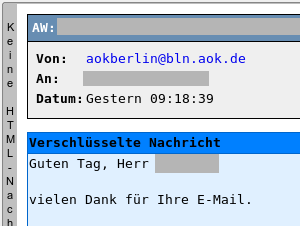 Ich hatte vor kurzem per eMail Kontakt mit der AOK Berlin.
Durchaus gross war meine Überraschung, als ich von dieser eine Mail bekam, die PGP-Verschlüsselt war. Wohlgemerkt, ich hatte nicht mit irgendeiner Security- oder Computerabteilung, sondern mit der gewöhnlichen Kundenbetreuung zu tun. Da mein Initialkontakt via Webformular stattfand, war auch keine Mailsignatur von mir dort angekommen, insofern kann ich nur annehmen, dass deren Mailsystem automatisiert auf einem Keyserver meinen Key gesucht hat und diesen verwendet. Oder ein motivierter Mitarbeiter hat diesen hier von der Webseite.
Dass sämtliche Mails an Mailadressen, für die Schlüssel existieren, automatisiert verschlüsselt werden, kann ich mir kaum vorstellen, weil hier erstens vermutlich ein erheblicher Supportaufwand entsteht (passiert mir selber ja oft genug dass ich Nachrichten der Form »bitte nicht verschlüsseln, ich hab meinen Key verlegt / grad nicht da«) und zweitens ja die Mailadressen in den Keys in keinster Weise verifiziert werden. Allerdings existiert beispielsweise das PGP Global Directory, in dem nur Keys mit regelmäßig verifizierten Mailadressen landen. Das erscheint mir im Moment die plausibelste Erklärung.
Auch wenn ich nicht genau weiss, wie die AOK an den passenden Key kam, lobenswert finde ich es allemal, dass sich zur Abwechslung mal jemand in einem aus Datenschutzgründen sehr sensiblen Bereich von selbst um verschlüsselte Kommunikation bemüht.
Monday, April 21. 2008
gajim with otr encryption
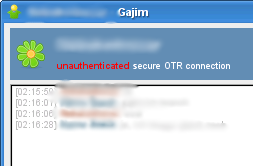 In the instant messaging world, encryption is a bit of a problem. There is no single standard that all clients share, mostly two methods of encryption are out there: pgp over jabber (as defined in the xmpp standard) and otr.
Most clients only support either otr (pidgin, adium) or pgp (gajim, psi), for a long time I was looking for a solution where both methods work. psi has otr-patches, but they didn't work when I tried them. kopete also has an otr-plugin, but I've not tested that yet.
Today I found that there is an otr-branch of gajim, which is my everyday client, so this would be great. As you can see on the picture, it seems to work on a connection with an ICQ user using pidgin.
I've created some ebuilds in my overlay (the code is stored in bazaar, I've copied the bzr eclass from the desktop effects overlay):
svn co https://svn.hboeck.de/overlay
Tuesday, October 5. 2004
New GPG/PGP Key
Quicksearch
About me
You can find my web page with links to my work as a journalist at https://hboeck.de/.
You may also find my newsletter about climate change and decarbonization technologies interesting.
Hanno Böck
mail: hanno@hboeck.de
Hanno on Mastodon
Impressum

You may also find my newsletter about climate change and decarbonization technologies interesting.
Hanno Böck
mail: hanno@hboeck.de
Hanno on Mastodon
Impressum
Creative Commons

Unless noted otherwise, all content is CC Zero / public domain


