Tuesday, June 3. 2008
Video editing with Cinelerra
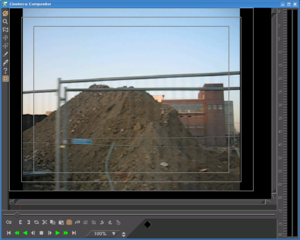 Sometimes in the past I had the wish to produce some simple videos, e. g. from political actions. Though I was looking for some free software solutions for video editing.
I asked around but it seemed that most people didn't use free solutions. I never did any video editing before, so I had no comparison on what proprietary tools are able to do. My requirements where not that advanced, basically I wanted to be able to cut some videos together, fade them in and out, add some text over them. Beside, I wanted to be able to display images for some seconds.
I knew of three free video editing tools for linux, Kino, PiTiVi and Cinelerra. Kino and PiTiVi are quite simple to use, they have an intuitive interface. But I soon came to the conclusion that they are far too limited in features. So Cinelerra is left.
Cinelerra is not a simple tool, it's interface is not intuitive. So this was keeping me away from using it for a long time. But the good news is, Cinelerra has all the features I wanted and can do much more. As I said above, I don't have any experience with commercial tools, but I think Cinelerra can do pretty much everything one will need when doing professional video editing.
To learn how to use Cinelerra, there are some great video tutorials at the_source. It's a (CC-by licensed) video show about free software and video stuff and they did four Cinelerra tutorials in their show. You should at least watch the first three and try the stuff out between the tutorials, but that will give you the basic knowledge to get started with Cinelerra.
So, the first Cinelerra-produced video by me should be available here within the next days.
Beside, I just bumped the Cinelerra package in Gentoo, so emerge it and have fun.
Trackbacks
Trackback specific URI for this entry
No Trackbacks
Comments
Display comments as
(Linear | Threaded)
Kdenlive (http://www.kdenlive.org/) is an other nice video editor, with more features than Kino but more intuitive (for me at least) than Cinelerra...
Quicksearch
About me
You can find my web page with links to my work as a journalist at https://hboeck.de/.
You may also find my newsletter about climate change and decarbonization technologies interesting.
Hanno Böck
mail: hanno@hboeck.de
Hanno on Mastodon
Impressum

You may also find my newsletter about climate change and decarbonization technologies interesting.
Hanno Böck
mail: hanno@hboeck.de
Hanno on Mastodon
Impressum
Creative Commons

Unless noted otherwise, all content is CC Zero / public domain
